
Connect BuiltSIGN to BuiltINVOICE
Paste a BuiltSIGN API token into BuiltINVOICE so you can send quotes and invoices for signature.
Only the owner or an admin of the BuiltINVOICE business can connect BuiltSIGN.
- In BuiltSIGN, create an API token and copy it.
- In BuiltINVOICE, open Settings and the Connections tab.
- Find the card BuiltSIGN: signatures on quotes.
- Paste the token into BuiltSIGN API token.
- Choose Connect BuiltSIGN. BuiltINVOICE checks the token first. The card then shows Connected.
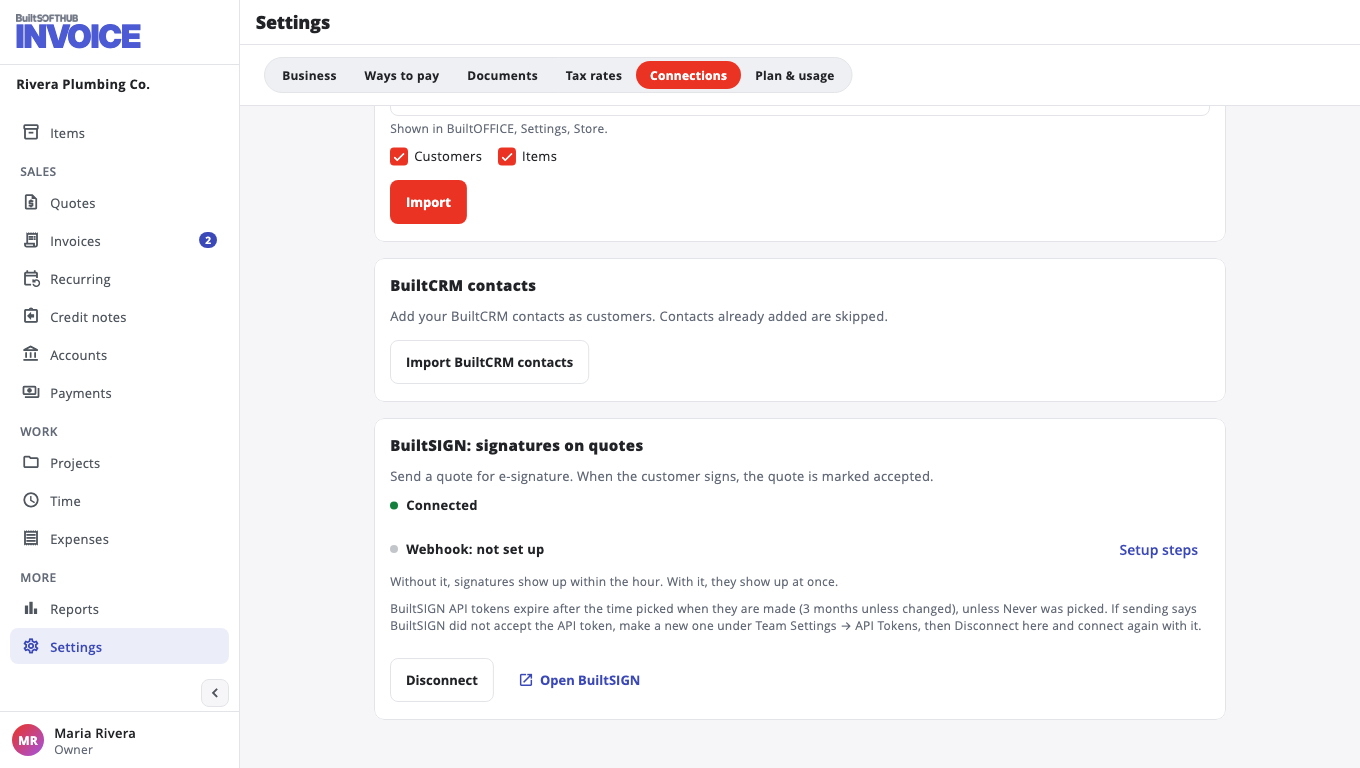
Quotes and invoices now show Send for signature. See Send a quote for signature.
Get signatures right away (optional)#
Without more setup, BuiltINVOICE checks BuiltSIGN for answers within the hour. To see a signature the moment it happens, set up instant updates.
Disconnect#
Choose Disconnect on the same card. You can't send new documents for signature, but requests already sent keep their status.
Use another BuiltSIGN account#
Paste a token from the other account and choose Connect BuiltSIGN again.
Was this helpful?
Thanks for letting us know.
Sorry it did not help. Tell us what was missing: open Help & Support in the app and choose Report a problem, or email support@builtsofthub.com.