
Update BuiltSync
BuiltSync updates itself overnight. Here is how to check the version, update now, or change the update time.
BuiltSync checks for a new version and installs it by itself at night (3:00 AM by default). If the new version doesn't start properly, it goes back to the old one.
Check your version#
- Open the dashboard (http://localhost:9847 on the store computer).
- Click Advanced on the left.
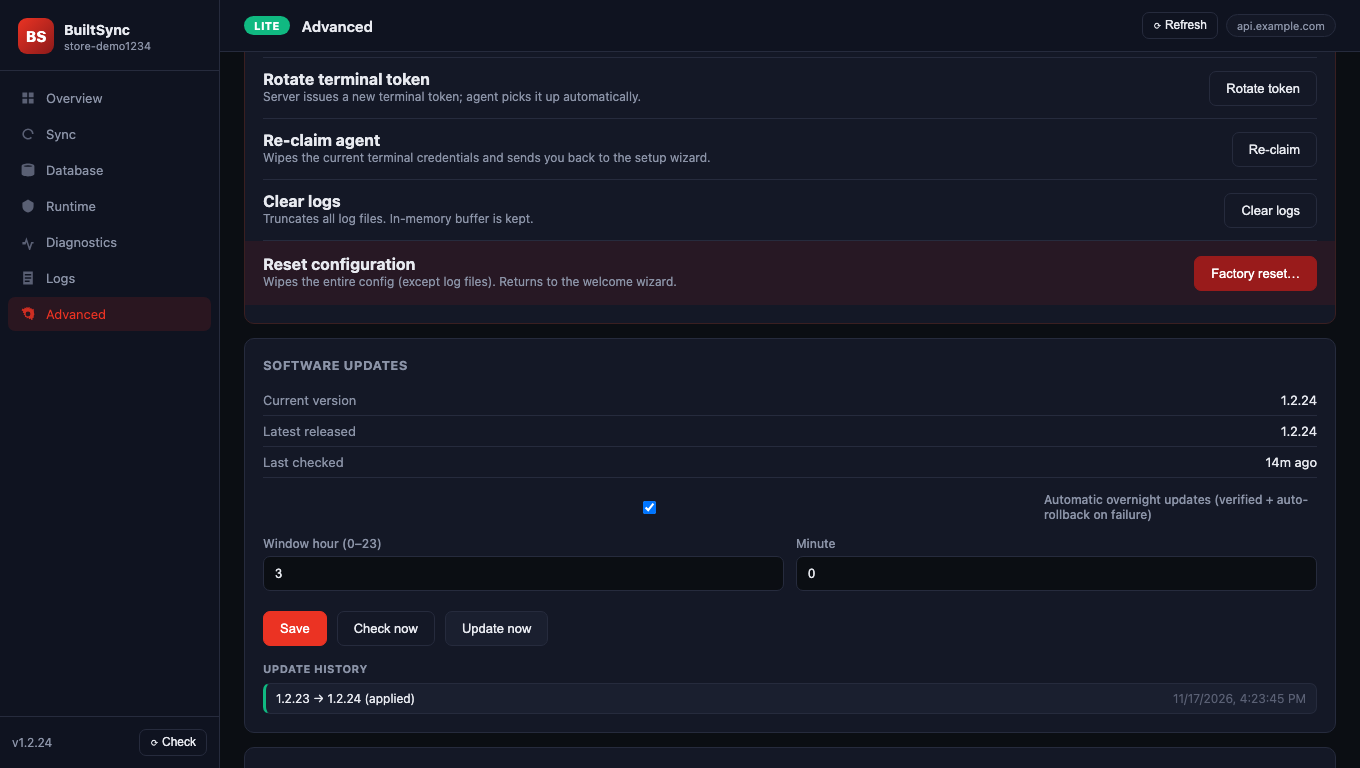
- Under Software updates you see Current version, Latest released and Last checked.
The version is also shown at the bottom of the left menu. ⟳ Check next to it checks for updates.
Update now#
- On Advanced → Software updates, click Check now.
- If it says "Update … available", click Update now and confirm. When that update will not install by itself overnight, the same line says why: it needs a manual update, or automatic updates are off.
- The agent stops, installs the new version and starts again. Reload the dashboard after a minute.
Do this when nobody needs live store data in BuiltOFFICE for a few minutes.
Change the update time or turn it off#
- On Advanced → Software updates, set Window hour (0–23) and Minute.
- To stop automatic updates, untick Automatic overnight updates (verified + auto-rollback on failure).
- Click Save.
The computer must be on at that time for the overnight update to run.
Update by reinstalling#
Some larger updates are not installed overnight — you start them with Update now. If Update now doesn't work, or the agent is very old:
- Download the latest BuiltSync installer from the Downloads page on our website.
- Run it on the store computer as an administrator.
Your claim, database settings and history are kept. You don't need a new claim token.
Good to know#
- Update history on the same card lists past updates and roll-backs.
- If BuiltSync came with the BuiltPOS Suite (a Local BuiltPOS store server), it is also updated when the Suite is updated.
Was this helpful?
Thanks for letting us know.
Sorry it did not help. Tell us what was missing: open Help & Support in the app and choose Report a problem, or email support@builtsofthub.com.