
Check that BuiltSync is connected
Read the four status lights on the BuiltSync dashboard, run the connection test, and get a support bundle.
Open the dashboard on the store computer: BuiltSync Dashboard shortcut, or http://localhost:9847 in a browser.
The four status lights#
Along the top are four lights. Green is good.
| Light | Green means | If red |
|---|---|---|
| Cloud | BuiltSync can reach the BuiltPOS cloud. | Check the internet connection. If it reads Unlinked, the cloud no longer accepts this agent — see Troubleshooting. |
| MSSQL | BuiltSync is connected to your SQL Server. | Point at the light to see why. Fix it on the Database page. |
| Service | The BuiltSync Windows service is installed and running. | Amber = not installed or stopped. Use the Runtime page. |
| Heartbeat | BuiltSync reported in to the cloud recently. | Usually follows a red Cloud light. |
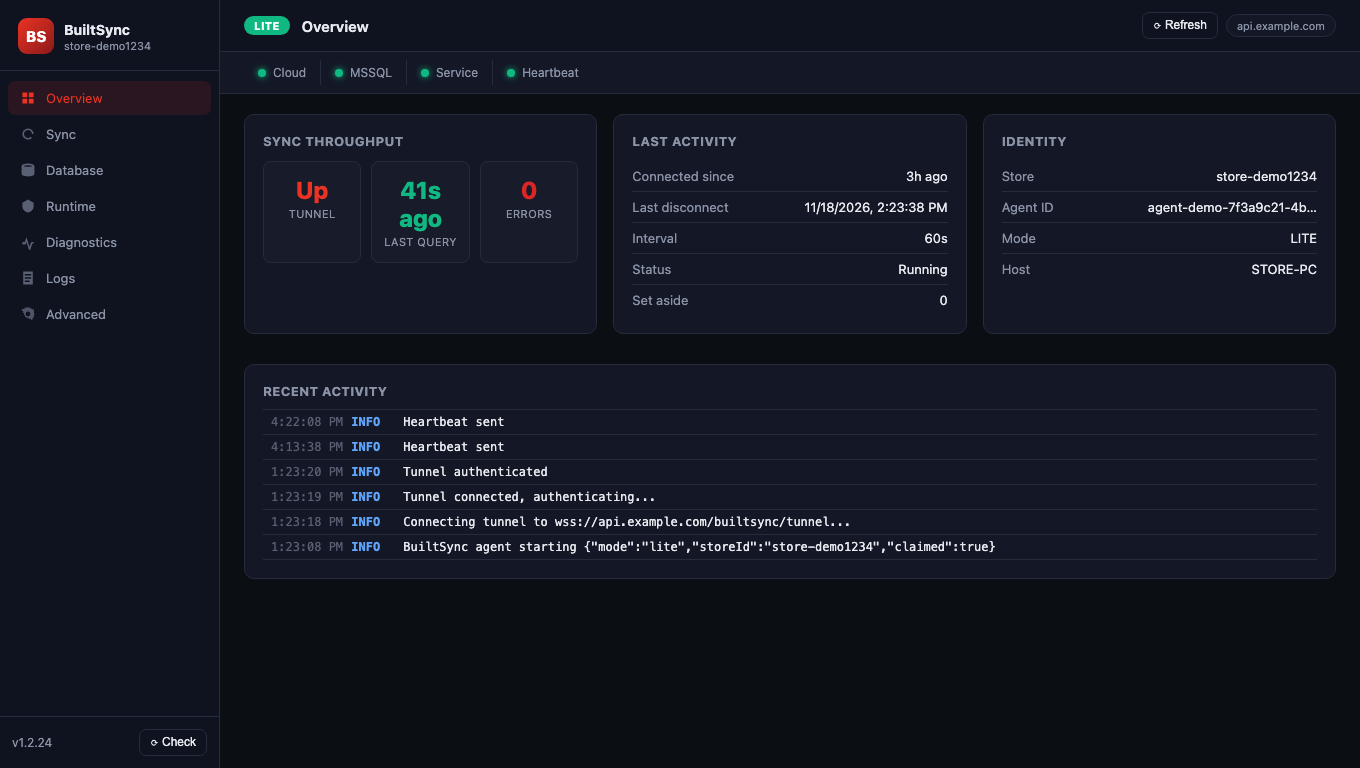
The badge at the top left shows the mode: LITE, FULL or LOCAL BUILTPOS.
The Overview page#
- Identity — your Store, Agent ID, Mode and computer name.
- Last activity — Status shows Running, Paused, or Unlinked - re-claim in BuiltOFFICE.
- Sync throughput and Last activity show Pushed, Pulled, Last push and Last pull on a Full store. On a Lite store the same boxes show the tunnel instead: Tunnel (Up or Down), Last query, Connected since and Last disconnect. Tunnel: Down means BuiltOFFICE can't read this store right now.
Run the connection test#
- Open Diagnostics on the left.
- Under Stepped connection test, click Run full test.
- It checks DNS → TCP → Auth → Query → Schema in order and shows which step fails.
Schema drift on the same page lists the POS tables BuiltSync expects and which were found. Click Re-check after changes.
Send details to support#
- On Diagnostics, under Support bundle, click Download diagnostic bundle.
- Attach the zip to your support ticket. Passwords are removed from it.
The Logs page shows recent agent messages. You can search, filter by level and Download.
In BuiltOFFICE#
- A BuiltSync Lite store shows a yellow strip: "Store data is view only (BuiltSync Lite)…". That is expected.
- If the agent is offline, Dashboard figures show — with "data unavailable". This is not $0 — the store computer just isn't connected right now. Check that the computer is on and online.
Good to know#
- Sync → Trigger sync now runs a cycle straight away (Full mode).
- The dashboard only opens on the store computer itself.
Was this helpful?
Thanks for letting us know.
Sorry it did not help. Tell us what was missing: open Help & Support in the app and choose Report a problem, or email support@builtsofthub.com.