
Get help and report a problem
Send a ticket, follow our replies and suggest ideas from Help & support in any app.
Every BuiltSOFTHUB app has Help & support in the account menu. It opens Help & feedback with four tabs.
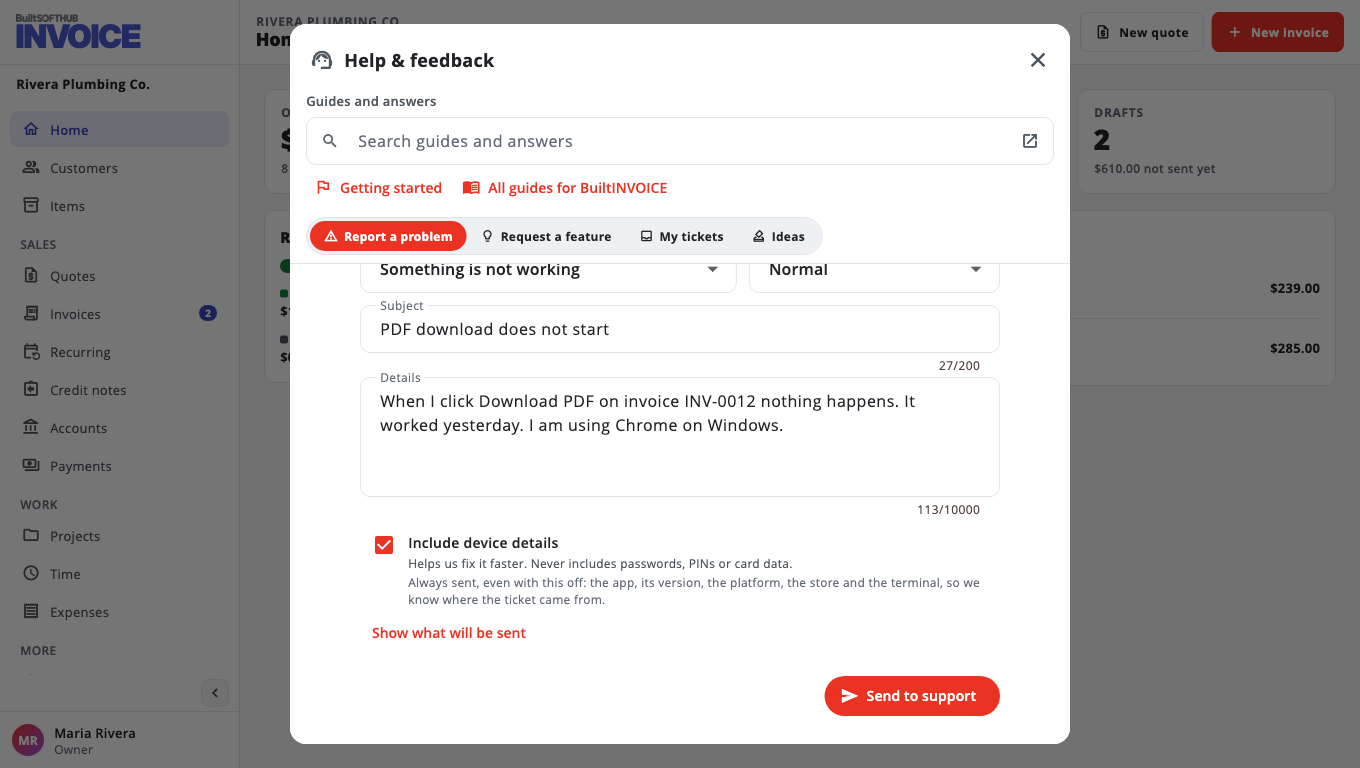
Report a problem#
- Open your account menu and choose Help & support.
- On Report a problem, pick a Category and a Priority. Choose Urgent — I can't sell only if you cannot take sales.
- Fill in Subject and Details: what happened, and what you expected.
- Leave Include device details on. It helps us fix it faster and never includes passwords, PINs or card data.
- Choose Send to support. You get a ticket number.
Follow your tickets#
Open My tickets to see our replies. Choose a ticket to read it and write a reply.
Suggest an idea#
- Open Request a feature, describe Your idea, and choose Send idea.
- Open Ideas to see what others asked for. Choose Vote on the ideas you want most.
Email#
You can also email support@builtsofthub.com.
Was this helpful?
Thanks for letting us know.
Sorry it did not help. Tell us what was missing: open Help & Support in the app and choose Report a problem, or email support@builtsofthub.com.