
Find your way around
What each part of the BuiltINVOICE menu is for.
The menu on the left (or the tabs at the bottom on a phone) takes you everywhere.
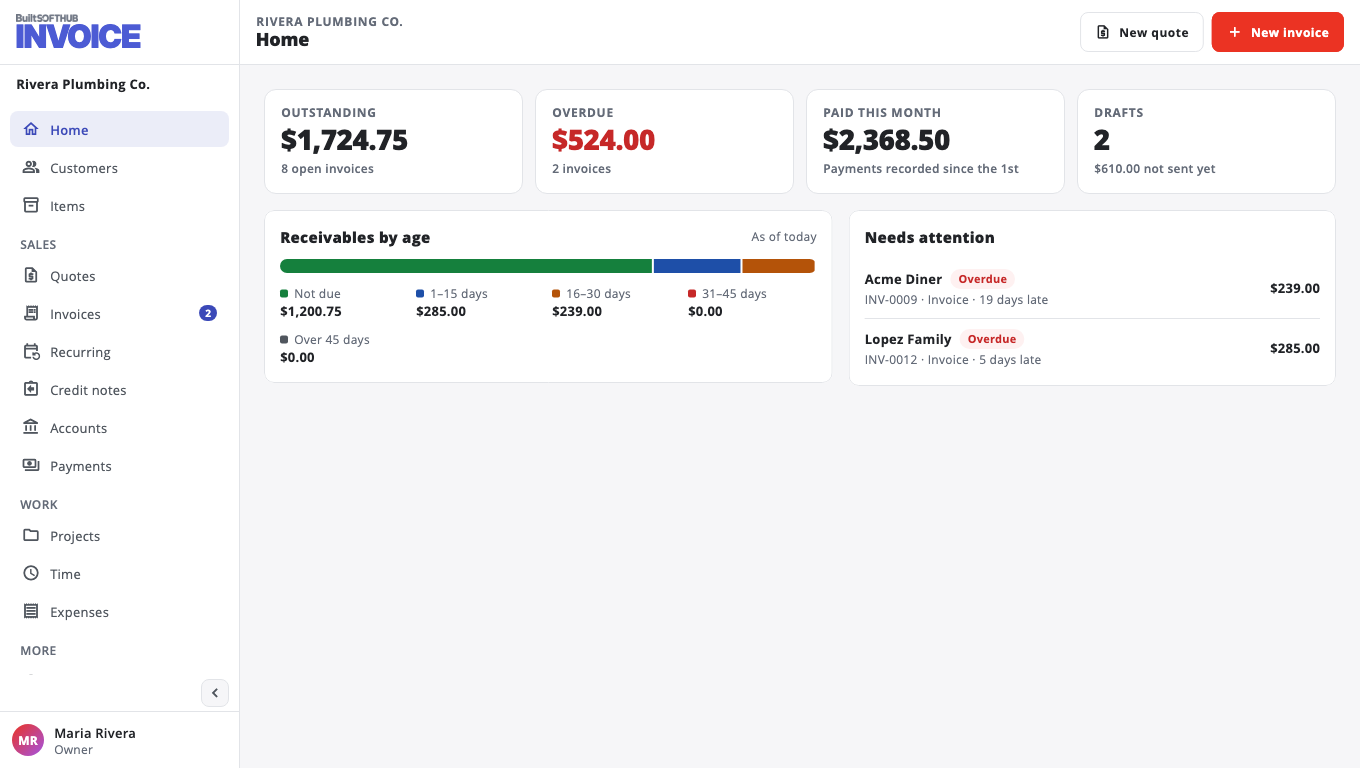
| Menu item | What it is for |
|---|---|
| Home | What you are owed, what is late, what was paid this month, and anything that Needs attention. |
| Customers | The people and companies you bill. |
| Items | The products and services you sell, so invoices fill themselves in. |
| Quotes | Prices you offer before the work. A customer can accept one online. |
| Invoices | Bills you send and get paid for. |
| Recurring | Invoices that are created on a schedule. |
| Credit notes | Money you give back or take off an invoice. |
| Accounts | Customers you bill "on account" and settle with a statement. |
| Payments | Every payment you have recorded. |
| Time and Expenses | Work and costs you can bill later. |
| Reports / Export | Download your records as Excel, CSV or PDF. |
| Settings | Your business, ways to pay, documents, tax rates, connections and your plan. |
On a phone, the bottom tabs are Home, Invoices, Quotes and Customers. The rest is in the menu.
Your account menu#
Your name at the bottom of the menu opens the account menu. From there you can:
- switch between light and dark mode,
- Switch business, if you belong to more than one,
- open Help & support to report a problem or suggest an idea,
- sign out.
The Switch app button at the top takes you to your other BuiltSOFTHUB apps without signing in again.
Was this helpful?
Thanks for letting us know.
Sorry it did not help. Tell us what was missing: open Help & Support in the app and choose Report a problem, or email support@builtsofthub.com.