
Set up ways to get paid
Choose how customers can pay you — card, bank, UPI, Zelle, check and more.
The ways to pay you switch on are printed on every invoice and shown on its pay page.
- Go to Settings and open the Ways to pay tab.
- Under How customers can pay you, switch on each way you accept.
- Fill in its details. For example:
- UPI ID and Payee name (India). The pay page shows a QR code and an Open UPI app button.
- Zelle email or phone, Venmo username, Cash App $cashtag or PayPal.Me name (US).
- Bank details (account name, number, routing / IFSC / IBAN).
- Make checks payable to and Mail checks to.
- Choose Save changes.
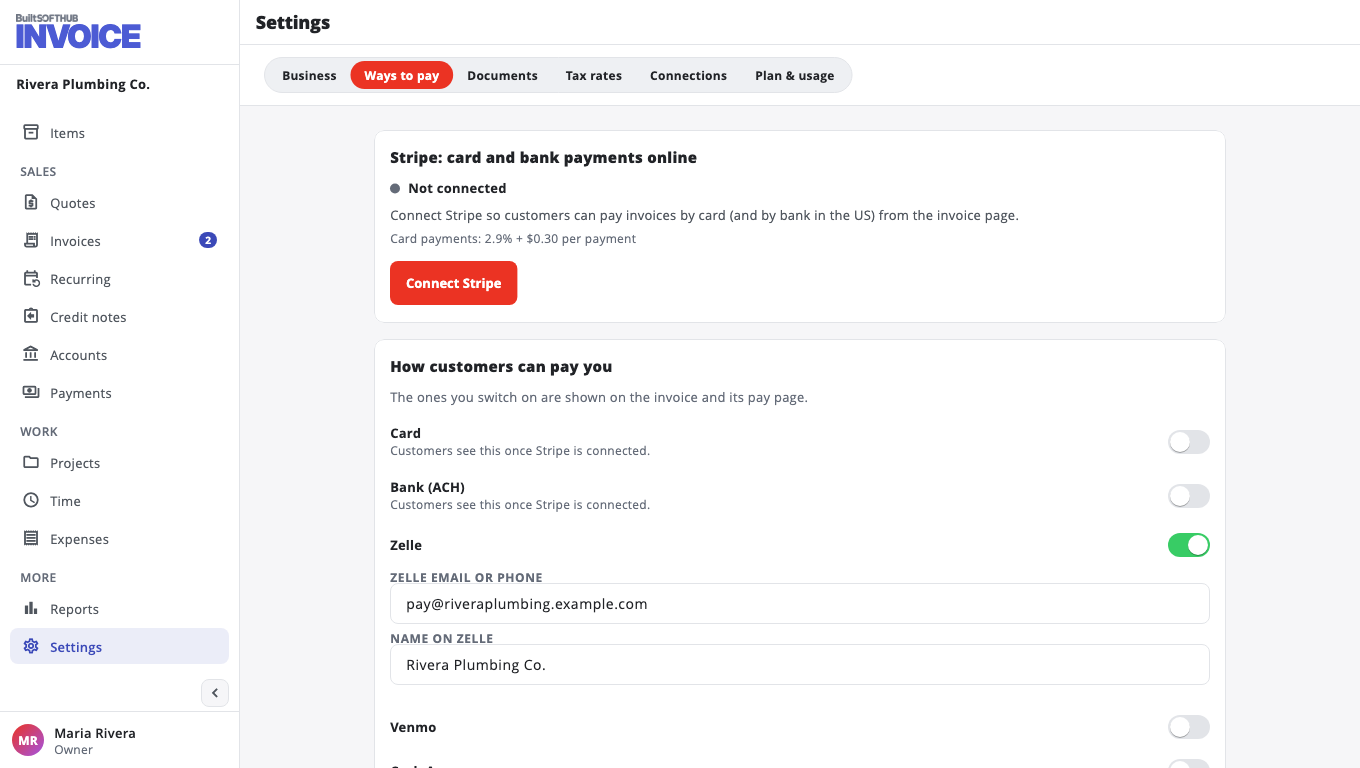
The list depends on your business country, so you only see the ways that are used where you are.
Want customers to pay by card from the invoice? Connect Stripe. See Take card and bank payments with Stripe.
When money arrives by any other way, record it on the invoice. See Record a payment.
Only the owner or an admin can change these settings.
Was this helpful?
Thanks for letting us know.
Sorry it did not help. Tell us what was missing: open Help & Support in the app and choose Report a problem, or email support@builtsofthub.com.