
How BuiltLTS works
The daily loop in BuiltLTS — deliver, activate, sell, scan at close, settle the drawer.
On this page
BuiltLTS tracks your scratch-off lottery tickets from the day a delivery arrives to the moment the drawer is counted. Everything follows one loop:
- Deliver — scan each pack in a new shipment with Delivery Scan. Packs are now in stock, in the back room.
- Activate — when a pack goes on the wall, use Activate Pack and tell the app which box it went into.
- Sell — clerks sell tickets as usual. The app stays quiet during the shift.
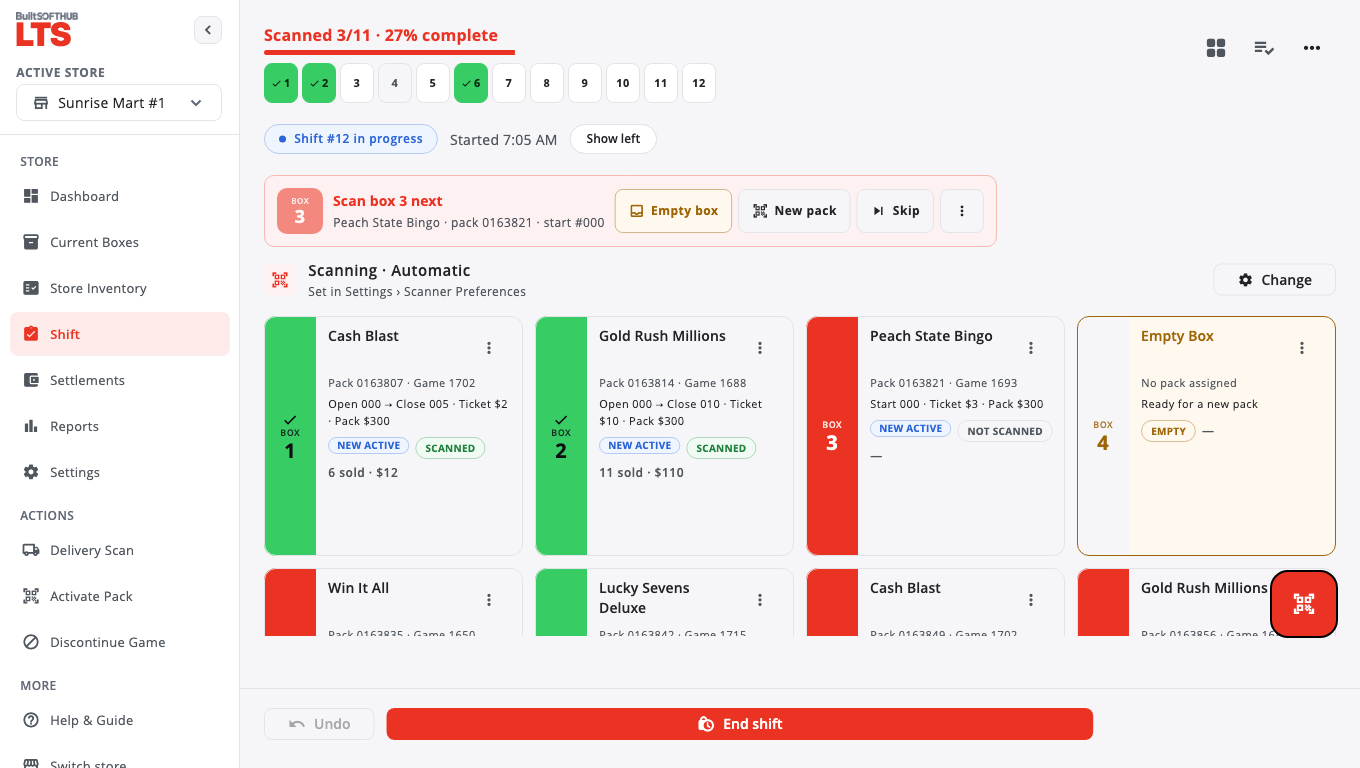
- Scan close — at the end of the shift, scan the ticket showing in every box, in any order.
- Settle — enter the totals from your lottery terminal report and the cash in the drawer. The app shows if you are over or short and saves a settlement PDF.
How the money is worked out#
The app never asks which ticket sold. It compares the ticket showing in each box at the start of the shift with the ticket showing at the end. That difference, times the ticket price, is the sale.
Tickets in a pack are numbered from 000 upward, and 000 counts. A $1 game with a $300 pack runs 000–299: 300 tickets.
Where things are#
The menu has Dashboard, Current Boxes, Store Inventory, Shift, Settlements, Reports and Settings. Under Actions you'll find Delivery Scan, Activate Pack and Discontinue Game. Help & Guide opens the in-app guide.
BuiltLTS runs in a web browser at lts.builtsofthub.com/app and as an app for Android and iPhone.
Was this helpful?
Thanks for letting us know.
Sorry it did not help. Tell us what was missing: open Help & Support in the app and choose Report a problem, or email support@builtsofthub.com.