
Set up your boxes
Scan your ticket wall into the app once so your first shift starts from the right numbers.
On this page
Before your first shift, tell BuiltLTS what is in every box on the wall.
- Open Current Boxes and tap Initial setup.
- In Plan the rack, enter How many boxes? and the First box number (type 001 to keep leading zeros). Tap Start.
- Walk the wall box by box. Scan the ticket currently showing in each box. Each scan goes to the next box number, so you can keep pulling the trigger down the rows.
- For a box with no pack in it, tap Box is empty.
- Tap Confirm on Confirm initial setup.
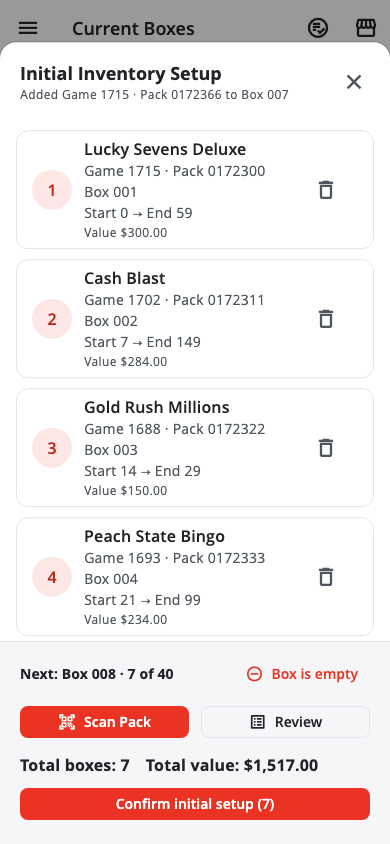
The ticket you scan becomes that pack's opening number for your first shift. Scan the exact ticket that would sell next.
Fix a box afterwards#
Tap the box's entry and edit it, or scan it again — the last scan wins.
Set the drawer float#
Go to Settings › Store Settings and enter the Cash drawer opening amount. This is the cash that stays in the drawer between shifts. The app takes it off when you count the drawer, so over/short is about the shift only.
Next: Start and run a shift
Was this helpful?
Thanks for letting us know.
Sorry it did not help. Tell us what was missing: open Help & Support in the app and choose Report a problem, or email support@builtsofthub.com.