
Find your way around BuiltCRM
What is in each part of the sidebar, and how to switch to your other BuiltSOFTHUB apps.
On this page
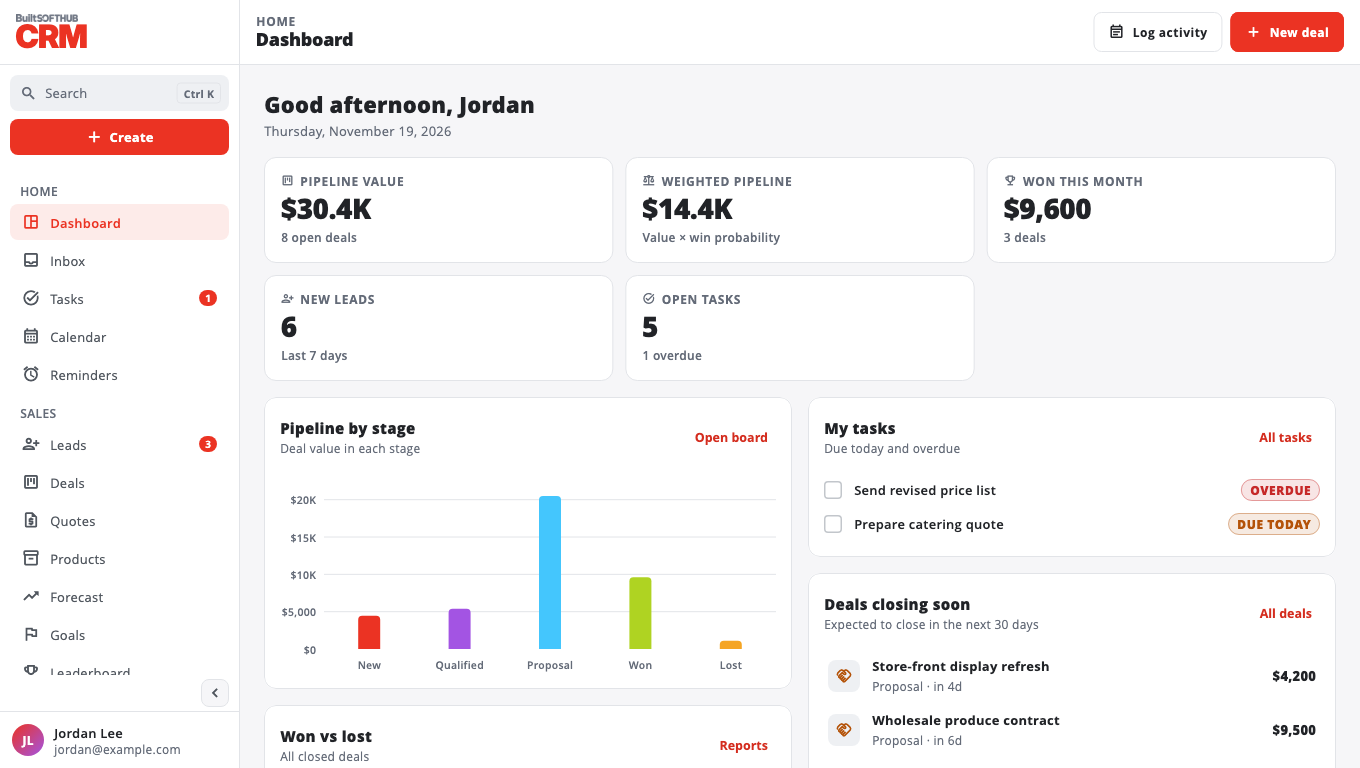
The sidebar groups every page:
- Home — Dashboard, Inbox, Tasks, Calendar, Reminders.
- Sales — Leads, Deals, Quotes, Products, Forecast, Goals, Leaderboard.
- Customers — Contacts, Accounts (companies), Businesses, Duplicates, Customer portal.
- Activity — Notes, Calls, Documents.
- Marketing — Campaigns, Email, Sequences, Social, Web forms, Lead scoring.
- Automation & AI — Workflows, Stale deals, AI agents, AI assistant.
- Insights — Reports, Audit log.
- Business — Team, Permissions, Marketplace, Settings.
Some pages are for planning only today and say Coming soon where something is not switched on yet (for example sending email campaigns or running workflows). See the FAQ.
Open your other apps#
Use BuiltSOFTHUB apps in the sidebar to open BuiltPOS, BuiltOFFICE, BuiltINVOICE and the rest. Apps you use open already signed in. See Sign in once across apps.
Settings#
Settings holds your account (with Sign out), Appearance (Light, Dark or System), Business currency, Refresh data, the customization pages (pipeline, custom fields, tags, saved views, templates) and Export.
Was this helpful?
Thanks for letting us know.
Sorry it did not help. Tell us what was missing: open Help & Support in the app and choose Report a problem, or email support@builtsofthub.com.