
Clean up product names
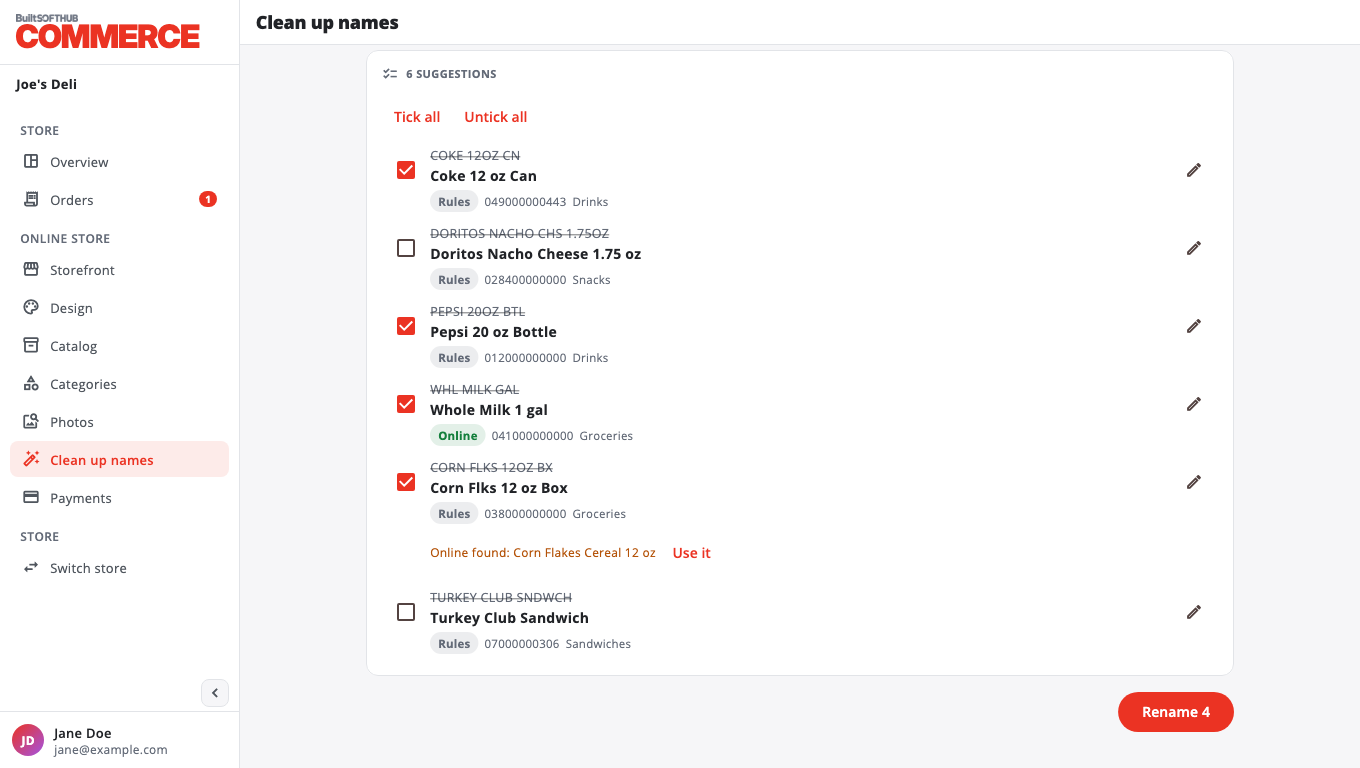
Turn till names like "COKE 12OZ CN" into names that read well online, such as "Coke 12 oz Can".
Renamed products change everywhere: the till, receipts, BuiltOFFICE and your online store. Barcodes, prices and stock do not change.
- Open Clean up names.
- Optional: pick a Category or type a name or barcode.
- Press Find names to fix. You get a list of suggestions.
- Check each row. To change a suggestion, press the edit button, type the name and press Use this name.
- For better suggestions, tick rows and press:
- Look up online: checks each barcode in the free Open Food Facts catalogue (food and drinks).
- Ask AI: uses the AI assistant, if it is set up for your account. If a better name is found, the row shows Online found: with a Use it button.
- Use Tick all or Untick all to choose the rows to rename.
- Press Rename and confirm.
Undo#
Right after renaming, press Undo on the message at the bottom of the screen. The old names come back.
If some rows were skipped, they were renamed on the till after the list was made. Press Find names to fix again to review them.
Was this helpful?
Thanks for letting us know.
Sorry it did not help. Tell us what was missing: open Help & Support in the app and choose Report a problem, or email support@builtsofthub.com.