
Show or hide products online
Turn the Online switch on or off for one product, or for a whole category at once.
On this page
Hiding a product online does not change it on the till or the kiosk.
One product#
- Open Catalog.
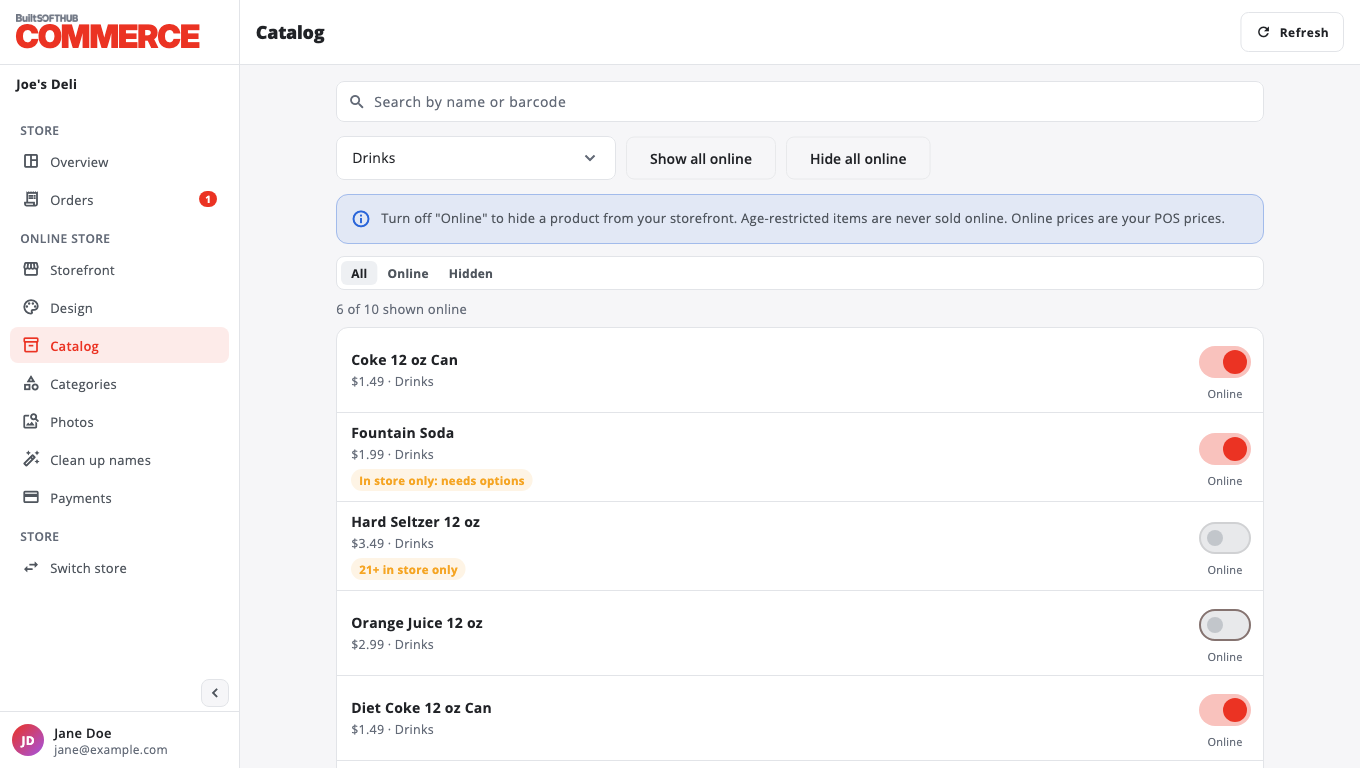
- Find the product. Use Search by name or barcode, or pick a category.
- Turn Online on or off. The change saves right away.
Use the Online and Hidden filters to see what customers can and cannot order.
A whole category#
- On Catalog, pick the category in the Category menu.
- Press Show all online or Hide all online, then confirm.
- A progress bar shows each product being changed. Press Stop to stop part way.
- When it finishes you see how many were shown or hidden, and how many failed.
Badges you may see#
- 21+ in store only or In store only: 21+ category: age-restricted items are never sold online.
- In store only: needs options: the product needs an option chosen, so it cannot be ordered online.
- Inactive: the product is turned off in your catalog.
- Category hours apply: the category is only shown at certain times.
Online prices are your POS prices. Change a price in BuiltOFFICE or on the till.
Big catalogs load in pages. Press Load more products at the bottom.
Was this helpful?
Thanks for letting us know.
Sorry it did not help. Tell us what was missing: open Help & Support in the app and choose Report a problem, or email support@builtsofthub.com.