
Create an invoice
Everything on the invoice editor — dates, currency, discounts, templates and drafts.
On this page
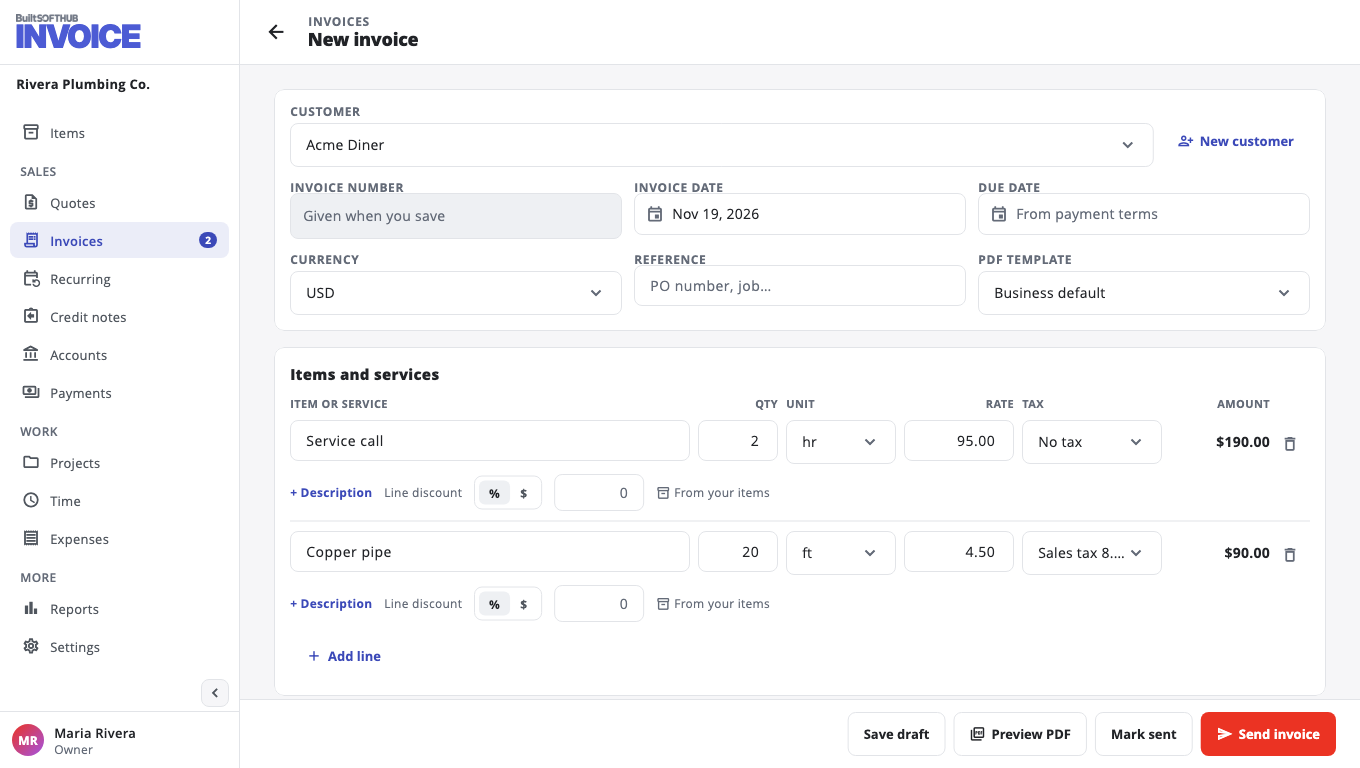
Open Invoices and choose New invoice. Pick the customer, then add your lines.
Fields you can change#
- Due date — set from your payment terms. Change it for this invoice if you need to.
- Currency — bill in another currency. Enter the Exchange rate (how many of your business currency one unit is worth).
- Reference — a PO number or job name.
- PDF template — Classic, Modern or Compact, or your Business default.
- Line discount — open a line to take money off that line only.
- Discount and Adjustment (e.g. Rounding) under Totals — for the whole invoice.
Tax, discount and the total are worked out when you save.
Drafts, copies and voids#
- Save draft keeps it without sending. Delete draft removes it.
- Duplicate (on an open invoice) makes a new draft with today's date.
- Void cancels a sent invoice that has no payments. It stays in your records but no longer counts as owed. This cannot be undone.
Every change shows under Activity on the invoice, including when the customer first viewed it.
Was this helpful?
Thanks for letting us know.
Sorry it did not help. Tell us what was missing: open Help & Support in the app and choose Report a problem, or email support@builtsofthub.com.