
Receive a delivery
Scan every pack in a lottery shipment and attach the invoice.
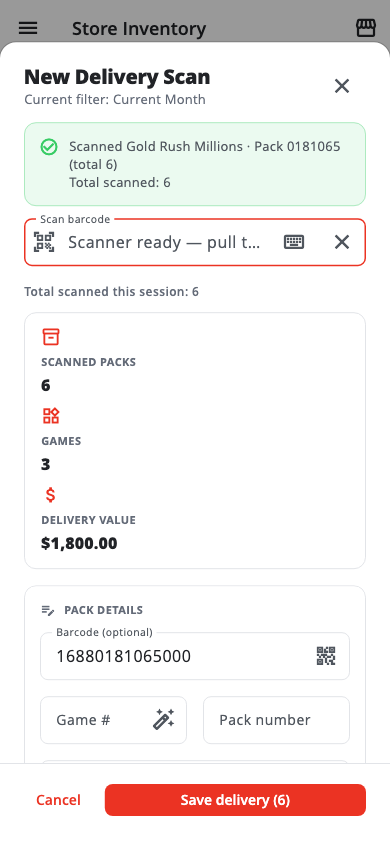
- Tap Delivery Scan in the menu (or Scan a delivery on Store Inventory).
- Tap Start scanner (or Scan one) and scan each pack in the shipment — one scan per pack.
- Watch the message under the scanner: Pack scanned — added to delivery means it worked. Scanning the same pack twice is flagged straight away.
- A pack shown in red means the game was not found in the Master List. Fill in the game, ticket value and pack value before saving.
- Tap Save delivery, then add the Invoice number (optional) and Invoice amount (optional) and tap Save.
If the invoice amount does not match the packs you scanned, the app shows Invoice amount does not match. Tap Review packs to find the missing pack, or Save anyway.
Delivered packs are in stock but not for sale yet. They stay in the back room until you activate them into a box.
See all deliveries under Store Inventory › Deliveries.
Was this helpful?
Thanks for letting us know.
Sorry it did not help. Tell us what was missing: open Help & Support in the app and choose Report a problem, or email support@builtsofthub.com.