
Fix time punches before payroll
Add a missed punch, close an open clock-in, edit or void a punch, with a reason for each change.
- In Run payroll, pick the period and choose Generate Paystubs.
- In the window, choose Review punches. The Edit Time Punches page opens for that period.
- Pick an employee, or keep All employees.
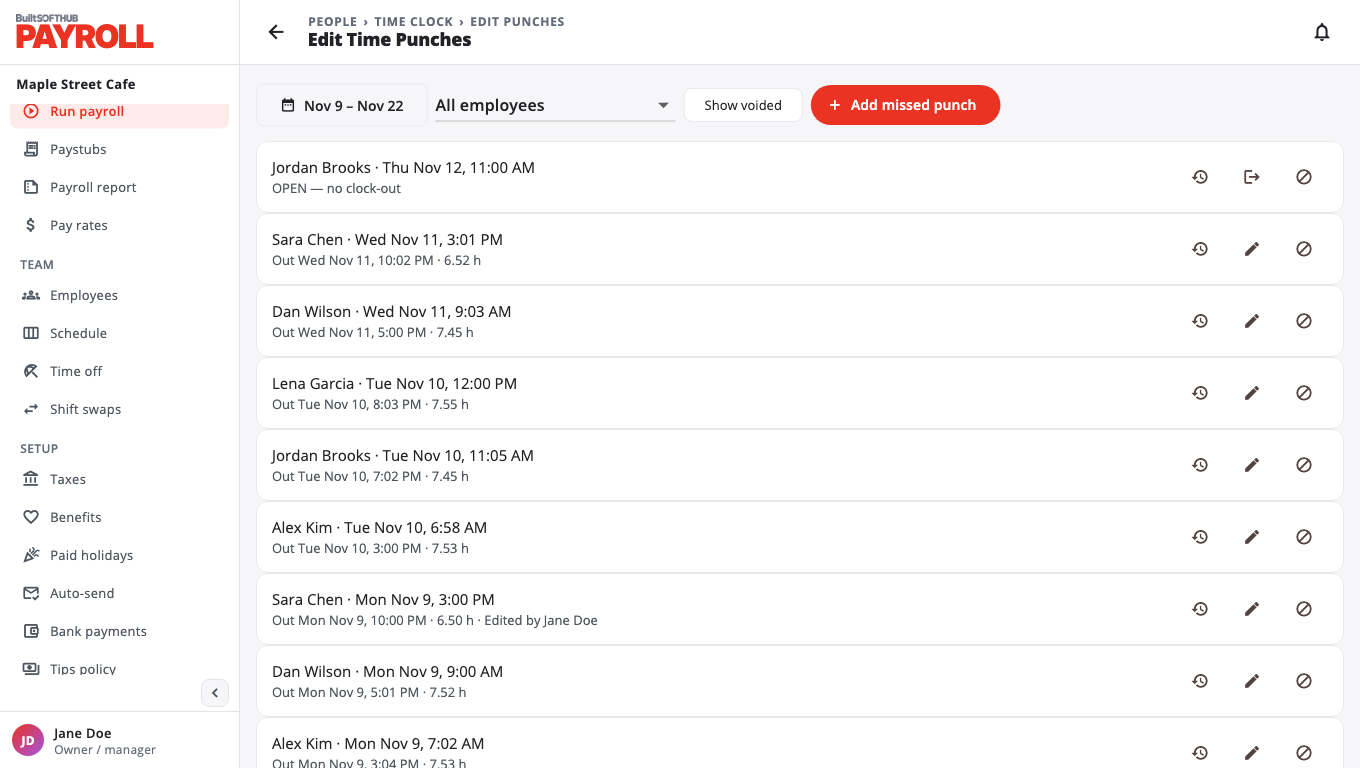
Add a punch someone forgot#
- Choose Add missed punch.
- Pick the Employee, then set Clock in and Clock out (store-local time).
- Enter a Reason (required) and choose Save.
Close an open clock-in#
On a punch that is still open, choose Close clock-out, set the time, give a reason and save.
Edit or void a punch#
- Edit (pencil) changes the times. A reason is required.
- Void removes the punch from pay. A reason is required. Turn on Show voided to see voided punches.
- History shows every edit made to that punch.
Punches in a pay period that is already finalized are locked and show Pay period finalized.
After fixing punches, go back and choose Generate Paystubs again.
Was this helpful?
Thanks for letting us know.
Sorry it did not help. Tell us what was missing: open Help & Support in the app and choose Report a problem, or email support@builtsofthub.com.