
Pay employees by bank deposit
Connect each employee's bank account through Stripe, then send finalized pay as bank deposits.
On this page
Bank deposit is optional. Each employee connects their bank once on a secure Stripe page. BuiltPAYROLL never sees their full bank details.
Connect an employee#
- Open Bank payments.
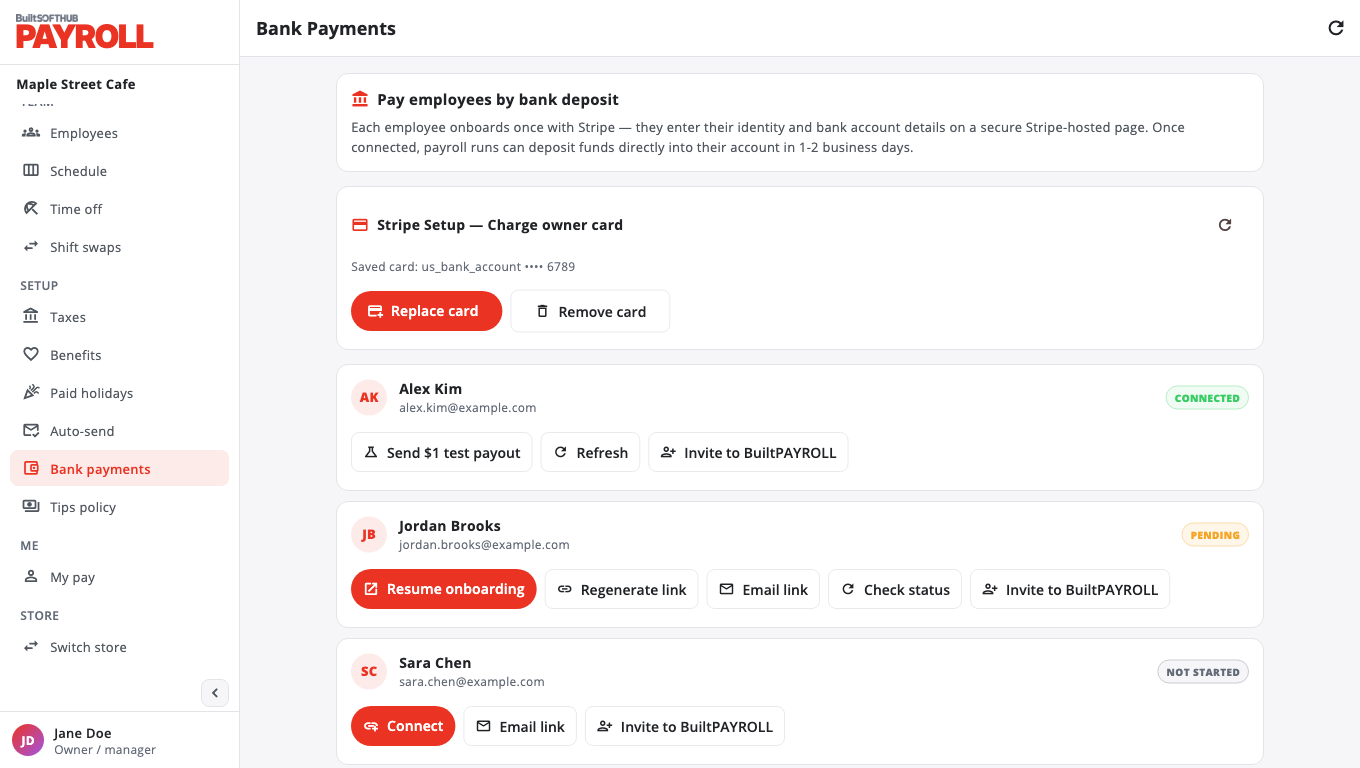
- On the employee's card, choose Connect to open the Stripe page on this device, or Email link to send it to them.
- The employee enters their identity and bank details on Stripe.
- Back in BuiltPAYROLL, choose Check status or Refresh. When the card shows the account as ready, they can be paid.
Employees can also connect from My pay: in Bank account, choose Set up.
If a link expires, choose Regenerate link. To change bank details later, choose Update info.
Send the pay#
- Finalize the paystubs in Run payroll.
- Choose Pay via Stripe.
- Pick the funding source and choose Send payouts.
Funds usually arrive in 1 to 2 business days.
The funding source must already hold enough money. Paying by the owner's card on file is not available yet. Contact support through Help & support to set up funding before your first bank-deposit payroll.
Only the account owner or an admin can connect employees and send payouts.
Was this helpful?
Thanks for letting us know.
Sorry it did not help. Tell us what was missing: open Help & Support in the app and choose Report a problem, or email support@builtsofthub.com.