
Work your deal pipeline
Create deals, move them through stages, and mark them won or lost.
Create a deal#
- Go to Deals → New deal (or New deal on a contact's page).
- Enter Deal name, Value, Currency, Stage, Probability %, Expected close, Contact, Account and Owner.
- Select Create deal.
Move a deal#
On the Board, drag the deal card into another stage column (on a phone or tablet, press and hold the card first). Or open the deal and pick a new Stage. Stages are New, Qualified, Proposal, Won and Lost.
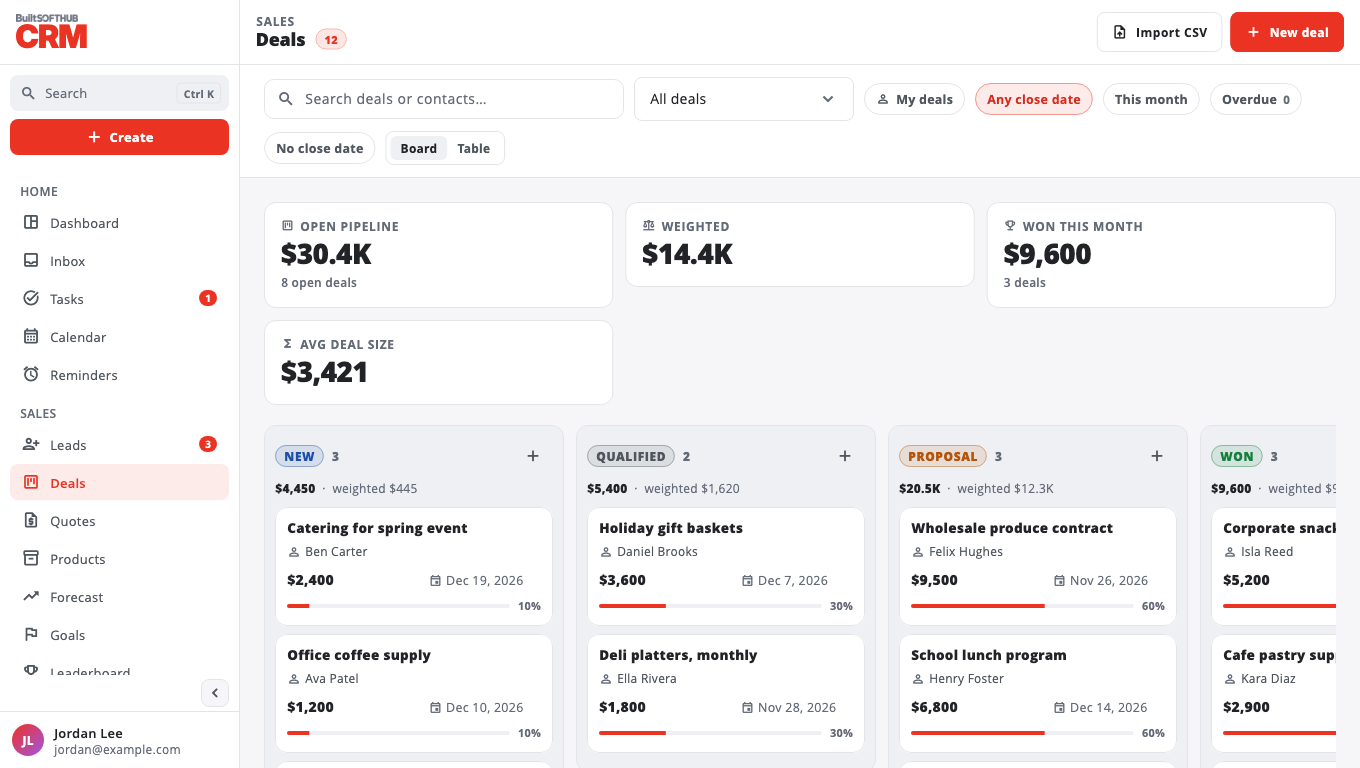
The top of the page shows Open pipeline, Weighted value, Won this month and Avg deal size. Use My deals to see only yours.
Win or lose#
Open the deal and select Mark won or Mark lost. When you mark a deal lost, add a Reason — it helps you spot patterns.
Change stage probabilities#
Go to Settings → Pipeline. Set each stage's Probability % (used for the weighted value and the forecast) and Rotting days (how long a deal can sit before it is flagged), then Save settings. Stage names are fixed for now.
Delete a deal#
Owners and admins can select Delete on the deal page.
Was this helpful?
Thanks for letting us know.
Sorry it did not help. Tell us what was missing: open Help & Support in the app and choose Report a problem, or email support@builtsofthub.com.