
Choose what the kiosk sells
Control which products and categories appear on the kiosk, and set up breakfast, lunch or happy-hour menus in BuiltOFFICE.
The kiosk sells your normal BuiltPOS products at their normal prices. You decide what shows on it in BuiltOFFICE. There is nothing to type on the kiosk itself.
What appears on the kiosk#
A product shows on the kiosk when all of these are true:
- the product is active and Show on Kiosk is on (it is on unless you turn it off);
- its category is active and set to All devices or Kiosk only;
- it is not marked out of stock ("86'd") by the kitchen.
Hide a product or a category#
- In BuiltOFFICE, open the product.
- Turn Show on Kiosk off and save. The product still sells on the register.
- To hide a whole category, edit the category and, under Device Visibility, pick POS only. Pick Kiosk only for a category that should never appear on the register.
Make time-based menus (optional)#
Without any menus, the kiosk sells everything that passes the rules above. Add menus when you want different items at different times of day.
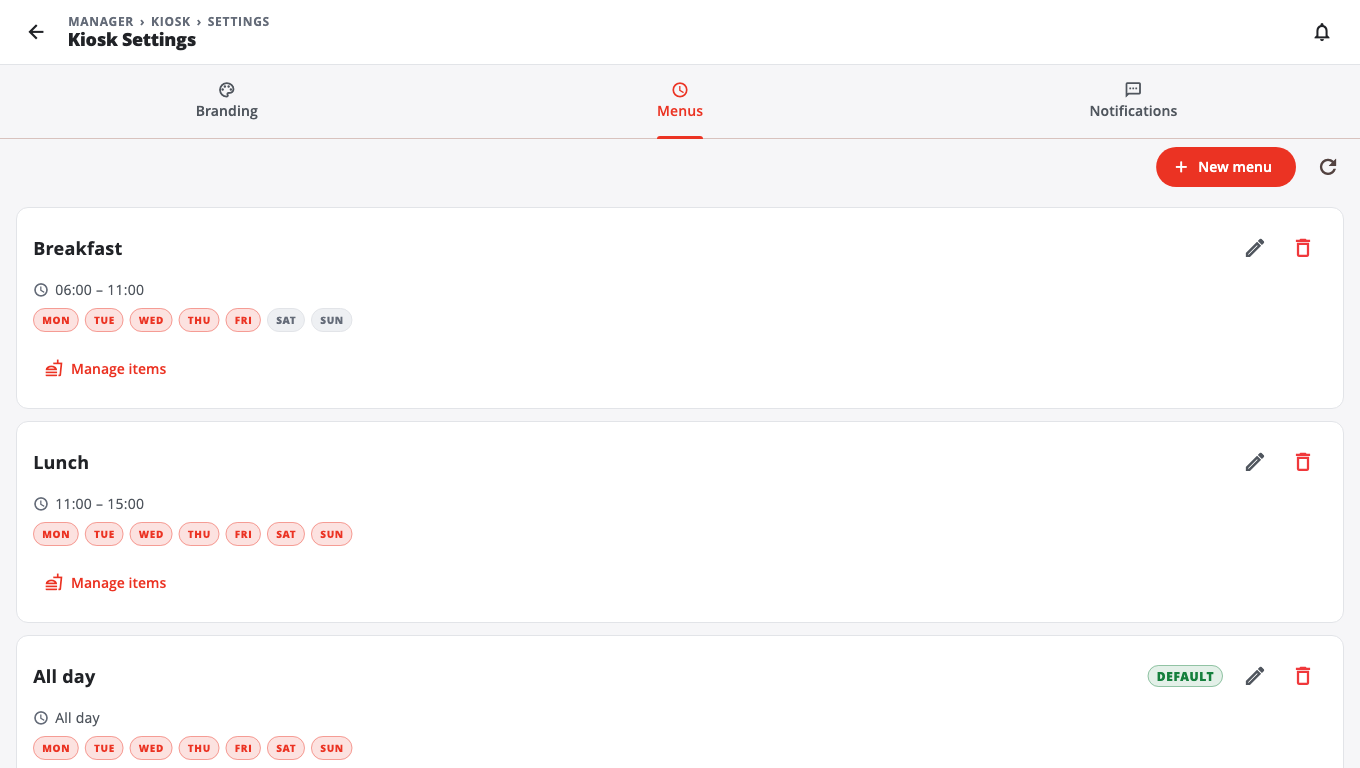
- In BuiltOFFICE, open Kiosk Settings (Kiosk section) and choose the Menus tab.
- Tap New menu.
- Type a Name (for example "Breakfast").
- Set Start and End times and pick the Days of week.
- Turn on Default menu for the one menu the kiosk should use when no other menu matches the clock.
- Tap Save.
- Tap Manage items on the menu. Tick the products it should sell. Tap the star (Featured on kiosk) to show a product at the top with a FEATURED badge.
- Tap Save.
Good to know#
- The switch next to each product in Manage items is the same Show on Kiosk setting. Turning it off hides the product on every kiosk menu.
- Changes reach the kiosk the next time a customer starts an order.
- If a customer has an item in the cart when its menu ends, the kiosk tells them it is not being served right now.
- Sizes, toppings and add-ons come from your modifiers, and meal deals come from Combos in BuiltOFFICE.
- Branding (logo, colours, app name, receipt footer) is on the Branding tab of Kiosk Settings. Kiosks pick up saved changes within about a minute.
- On the kiosk, Kiosk Settings → View menu & add products lists the menu and can add a new product. To change prices or hide items, use BuiltOFFICE.
- See also Products and categories.
Was this helpful?
Thanks for letting us know.
Sorry it did not help. Tell us what was missing: open Help & Support in the app and choose Report a problem, or email support@builtsofthub.com.