
Choose what each role can do
Turn View, Add, Edit and Delete on or off for managers and cashiers, module by module.
Only the store owner and admins can change role permissions.
Change a role's permissions#
- Go to Customers & employees → Role Permissions.
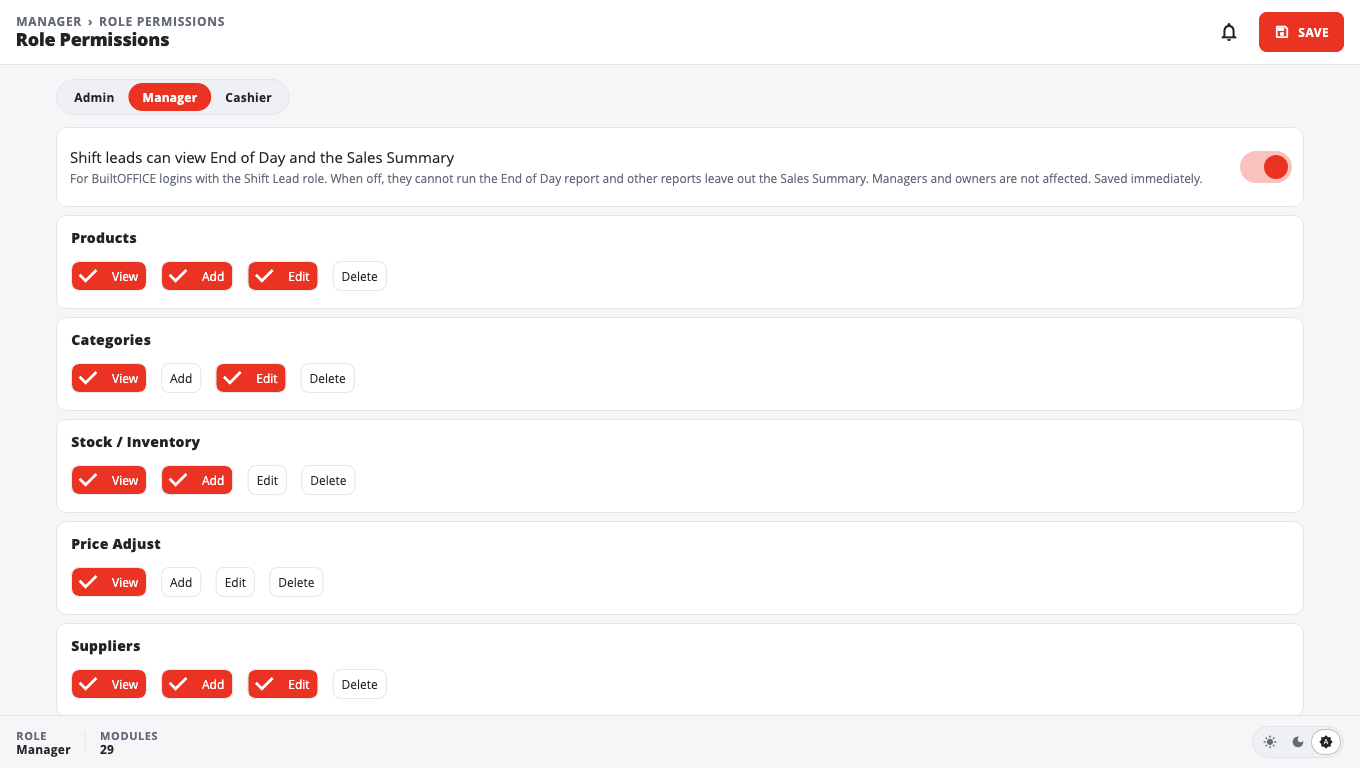
- Pick the tab for the role: Manager or Cashier.
- Find the area you want to change, for example Products, Returns / Refunds, Void Transaction, Discount or Store Settings.
- For each area, turn on the actions the role may do: View, Add, Edit, Delete.
- Tap Save. You see Permissions saved.
The tills pick up the new permissions on their next sync.
The Admin tab#
The Admin tab only says Admin has full access to all modules. Admins can't be limited.
Shift leads and sales reports#
On the Manager tab there is a switch: Shift leads can view End of Day and the Sales Summary. It is on by default.
- When it is off, people who sign in to BuiltOFFICE as a Shift Lead can't run the End of Day report, and other reports leave out the Sales Summary.
- Managers and owners are not affected.
- This switch saves as soon as you flip it. You don't need to tap Save.
EDI invoice review#
EDI Invoice Review controls who may check and confirm supplier EDI invoices. Managers have it unless you turn it off. Cashiers only get it if you turn it on. See Receive EDI invoices.
Good to know#
- Some actions on the till can also ask for a manager PIN, depending on your till settings (for example No Sale / Open Drawer needs a manager in POS Settings → Till Defaults).
- A role that has never been changed starts from BuiltPOS's standard permissions.
Was this helpful?
Thanks for letting us know.
Sorry it did not help. Tell us what was missing: open Help & Support in the app and choose Report a problem, or email support@builtsofthub.com.