
Discounts and price overrides
Discount one line or the whole sale, comp an item, change a price and apply a coupon — and when a manager PIN is needed.
Discount one item#
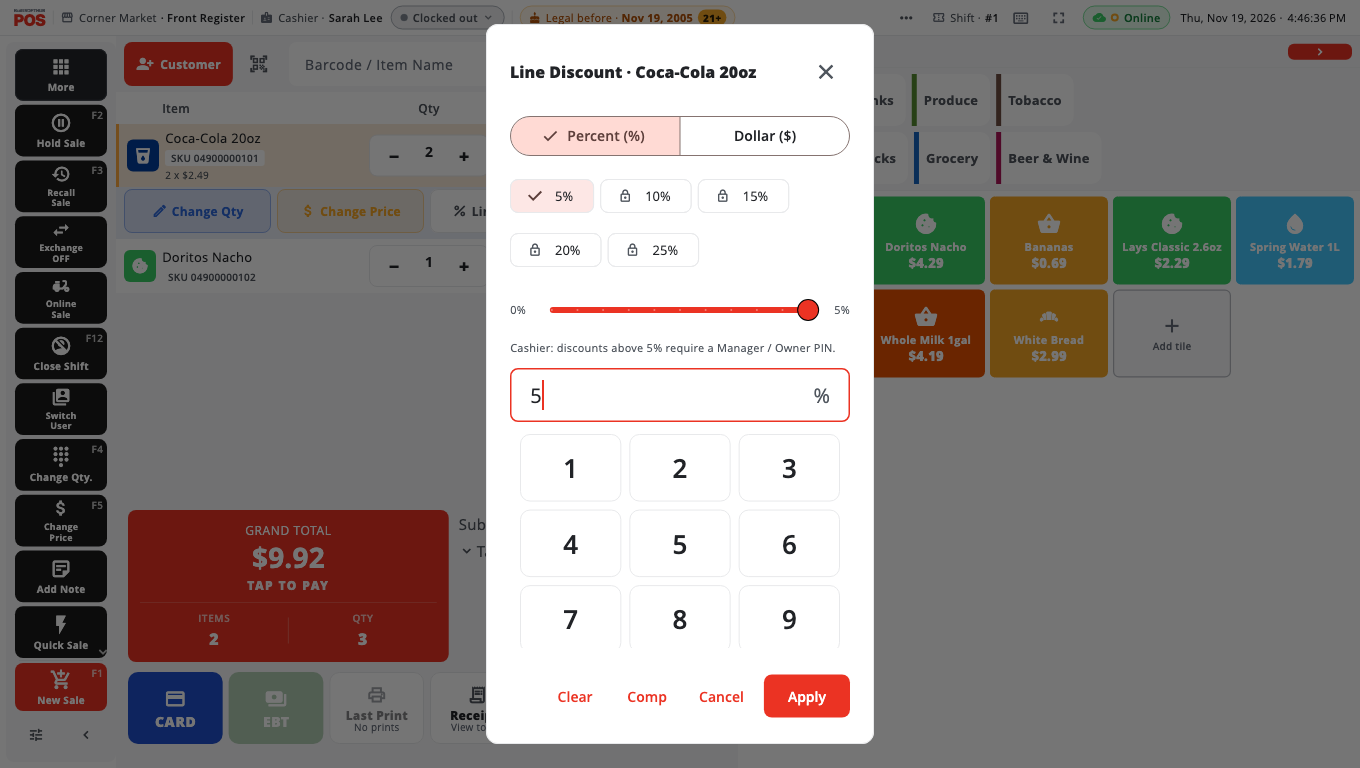
- Tap the line in the cart, then tap Line discount.
- In Line Discount, choose Percent (%) or Dollar ($).
- Enter the amount (or tap a preset %) and tap Apply.
To give the item away, tap Comp. To take the discount off again, open it and tap Clear.
Discount the whole sale#
- Tap Customer Discount on the left button panel (or Discount in More).
- Choose Percent (%) or Dollar ($), enter the amount and tap Apply.
Change an item's price#
- Tap the line, then tap Change Price (F5 on Windows).
- Type the new price on the keypad and tap ENTER.
Items sold at "open price" ask for a price when you add them — the dialog is called Set Price then.
Apply a coupon#
On Take payment, tap Coupon and enter or scan the coupon code.
When a manager PIN is needed#
Cashiers can make small changes on their own. Above the store's limits, BuiltPOS asks for an Owner / Manager PIN (the reason shows underneath) — a manager or owner types their PIN on the keypad. Owners and managers signed in themselves are not asked.
| Change | Cashier limit (standard setting) |
|---|---|
| Percent discount (line or sale) | Up to 5% |
| Dollar discount | Always needs a manager |
| Comp (give the item away) | Always needs a manager |
| Change Price | Up to 20% below the item's price |
The owner can change these limits in Store Management → Operations (for example Cashier discount ceiling (PIN above)).
Good to know#
- Every price change and override is recorded, with who approved it, and shows in BuiltOFFICE and Store Management → Audit Center → Price Overrides.
- Promotions set up in BuiltOFFICE apply automatically when the items are in the cart. See Promotions and coupons.
- Discount Override (in Manager's Functions) applies a percentage to the entire cart and is for managers only.
- Coupons, fuel, gift cards, store credit and return lines cannot be comped.
Was this helpful?
Thanks for letting us know.
Sorry it did not help. Tell us what was missing: open Help & Support in the app and choose Report a problem, or email support@builtsofthub.com.