
Customer accounts on your storefront
What customers can do with an account on your store page, and how guest checkout works.
Customers can order as a guest, or create an account on your store page. There is nothing for you to set up.
An account belongs to your store only. A customer who orders from two stores has two accounts.
What customers can do#
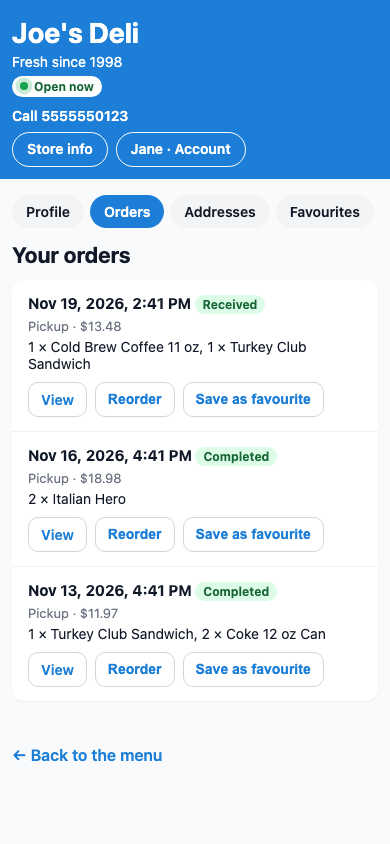
From your store page, customers choose Sign in or Create an account. Once signed in they have:
- Orders: past orders, with Reorder.
- Addresses: saved delivery and billing addresses.
- Favourites: favourite orders to reorder quickly.
- Your account: name, contact, password, and deleting the account.
Email confirmation#
New accounts confirm their email first. The customer sees Check your email, opens the link (it works for 24 hours) and signs in. They can press Send a new link if it did not arrive.
Forgotten passwords#
Customers use Forgot your password? on the sign-in page. For privacy, the page never says whether an email has an account.
Store info page#
Your store page links to Store info, which shows your address, phone, hours, upcoming closed dates and About your store.
Was this helpful?
Thanks for letting us know.
Sorry it did not help. Tell us what was missing: open Help & Support in the app and choose Report a problem, or email support@builtsofthub.com.