
Payment reminders and receipts
Remind customers before and after the due date, send receipts, and get emailed when you are paid.
On this page
All three are off until you turn them on. Go to Settings, Documents.
Payment reminders#
- Turn on Send payment reminders.
- Set Days before the due date and Days after the due date. You can have up to 6 reminders, from 1 to 120 days.
- Under Send by, tick Email, SMS and/or WhatsApp.
- Save.
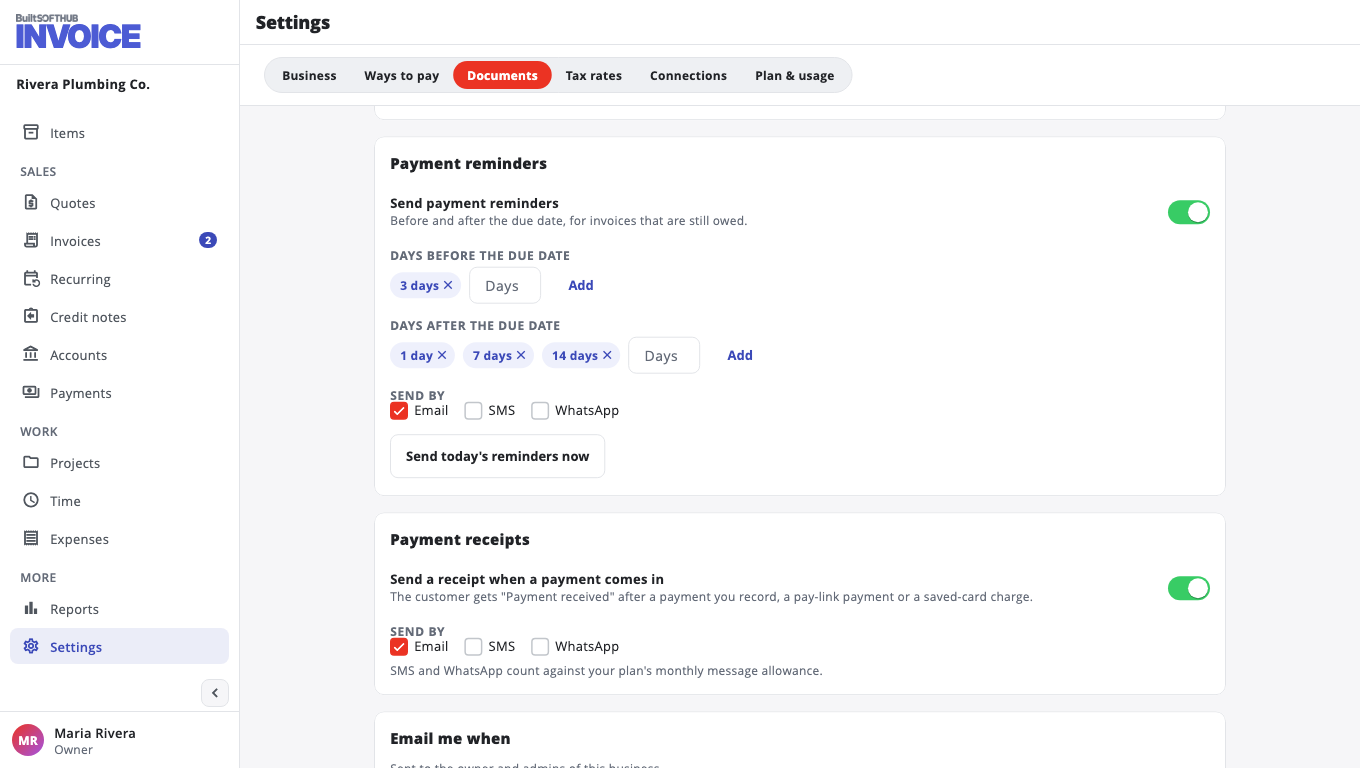
Reminders go only to invoices that are still owed. Each reminder goes out once. To skip a customer, open them and turn on Don't send this customer reminders.
Want to send them right away? Choose Send today's reminders now.
Reminders follow your business Time zone (Settings, Business). Set it so "overdue" means overdue where you are.
Payment receipts#
Turn on Send a receipt when a payment comes in. The customer gets "Payment received" after a payment you record, a pay-link payment or a saved-card charge.
Emails to you#
Under Email me when, tick what you want to hear about, such as An invoice is paid online, A quote is accepted or A saved-card charge fails. These go to the owner and admins of the business.
SMS and WhatsApp count against your plan's monthly message allowance.
Was this helpful?
Thanks for letting us know.
Sorry it did not help. Tell us what was missing: open Help & Support in the app and choose Report a problem, or email support@builtsofthub.com.