
Recurring invoices
Bill the same customer on a schedule — weekly, monthly, quarterly or yearly.
- Open an invoice you send again and again.
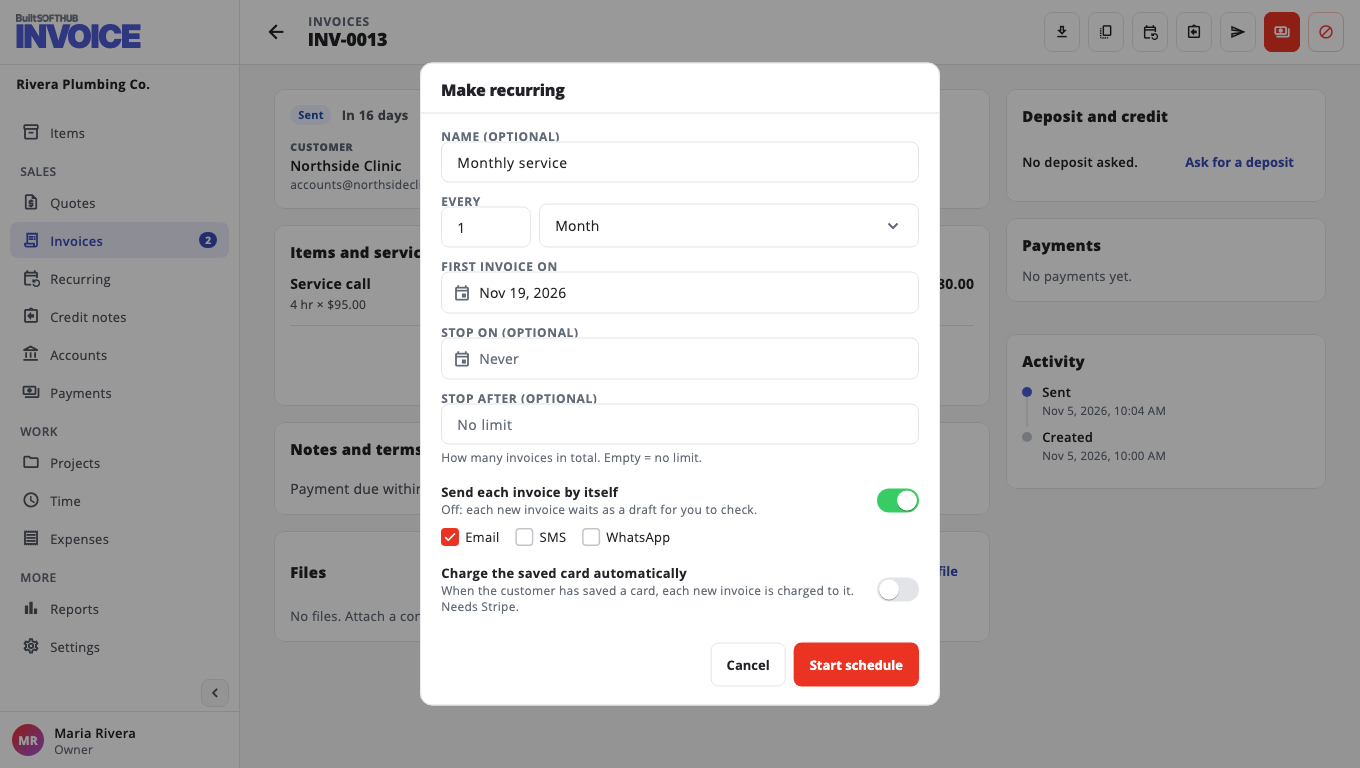
- Choose Make recurring.
- Give it a Name (optional), such as "Monthly service".
- Choose Every and Repeat (Week, Month, Quarter or Year).
- Set First invoice on, and if you like Stop on (optional) or Stop after (optional).
- Decide how it is sent:
- Turn on Send each invoice by itself and tick Email, SMS or WhatsApp, or
- turn it off so each new invoice waits as a draft for you to check.
- Optional: Charge the saved card automatically (needs Stripe and a saved card).
- Choose Start schedule.
Manage schedules#
Open Recurring to see each schedule and its next date. You can Run now, Pause, Resume or Edit it.
If an invoice could not be sent or charged, it is kept as a draft and the schedule is paused. Fix the reason, then choose Resume.
Was this helpful?
Thanks for letting us know.
Sorry it did not help. Tell us what was missing: open Help & Support in the app and choose Report a problem, or email support@builtsofthub.com.