
Group work into projects and attach files
Keep the quotes, invoices, time and expenses of one job together, with a budget and files.
Projects#
- Open Projects and choose New project.
- Enter the Name, and optionally a Customer, a Budget and a Description.
- Choose Save.
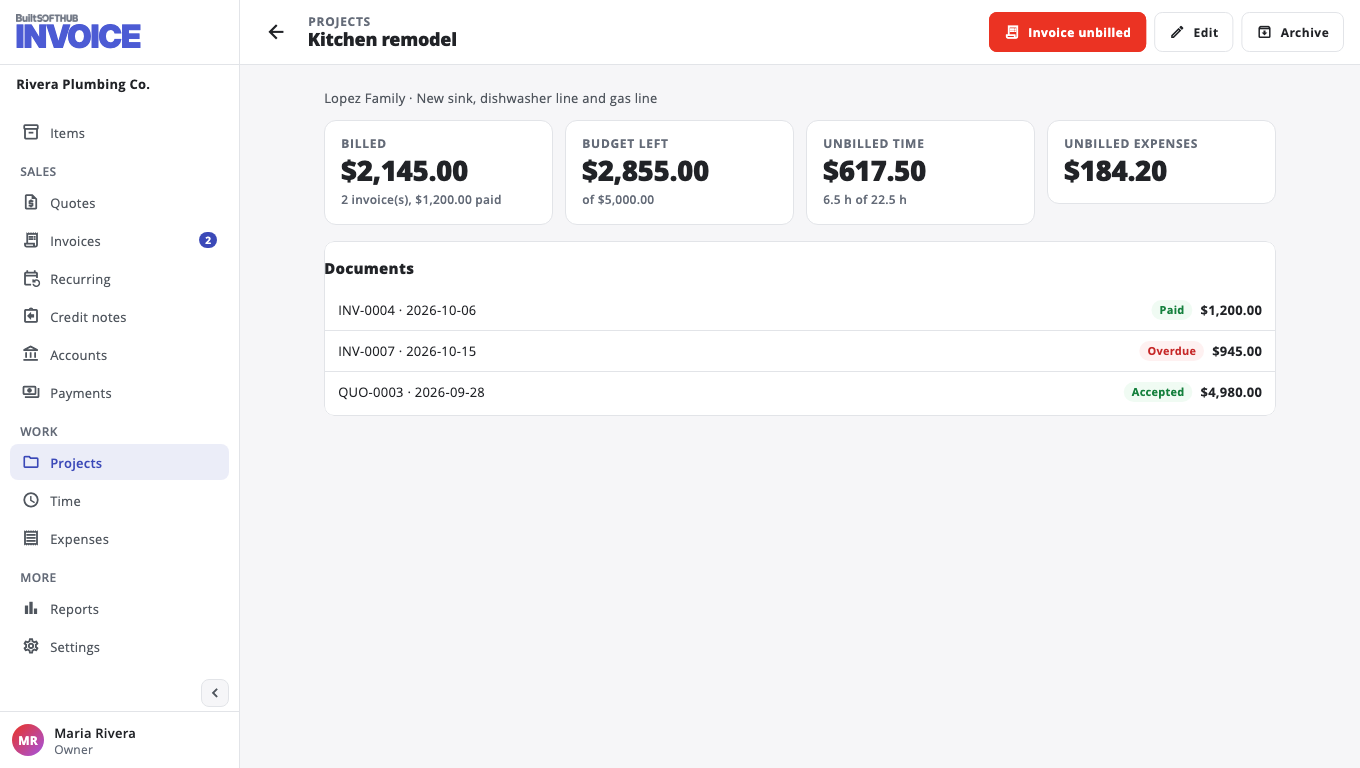
Pick the project on quotes, invoices, time and expenses (the Project field). The project page shows what you have Billed, the Budget left, and Unbilled time and Unbilled expenses. Choose Invoice unbilled to bill them. Archive a project when the job is done.
Files#
On a quote, invoice or expense, the Files card lets you Attach file (up to 10 MB each), such as a contract, drawings, photos or a receipt.
- Files are private unless you tick Show to customer on the pay page.
- When you send a document by email, tick files under Also attach (optional) to send them with it.
Was this helpful?
Thanks for letting us know.
Sorry it did not help. Tell us what was missing: open Help & Support in the app and choose Report a problem, or email support@builtsofthub.com.