
Add benefits and PTO
Add per-employee benefit deductions such as health or 401(k), and track paid time off balances.
On this page
Open Benefits.
Add a benefit for an employee#
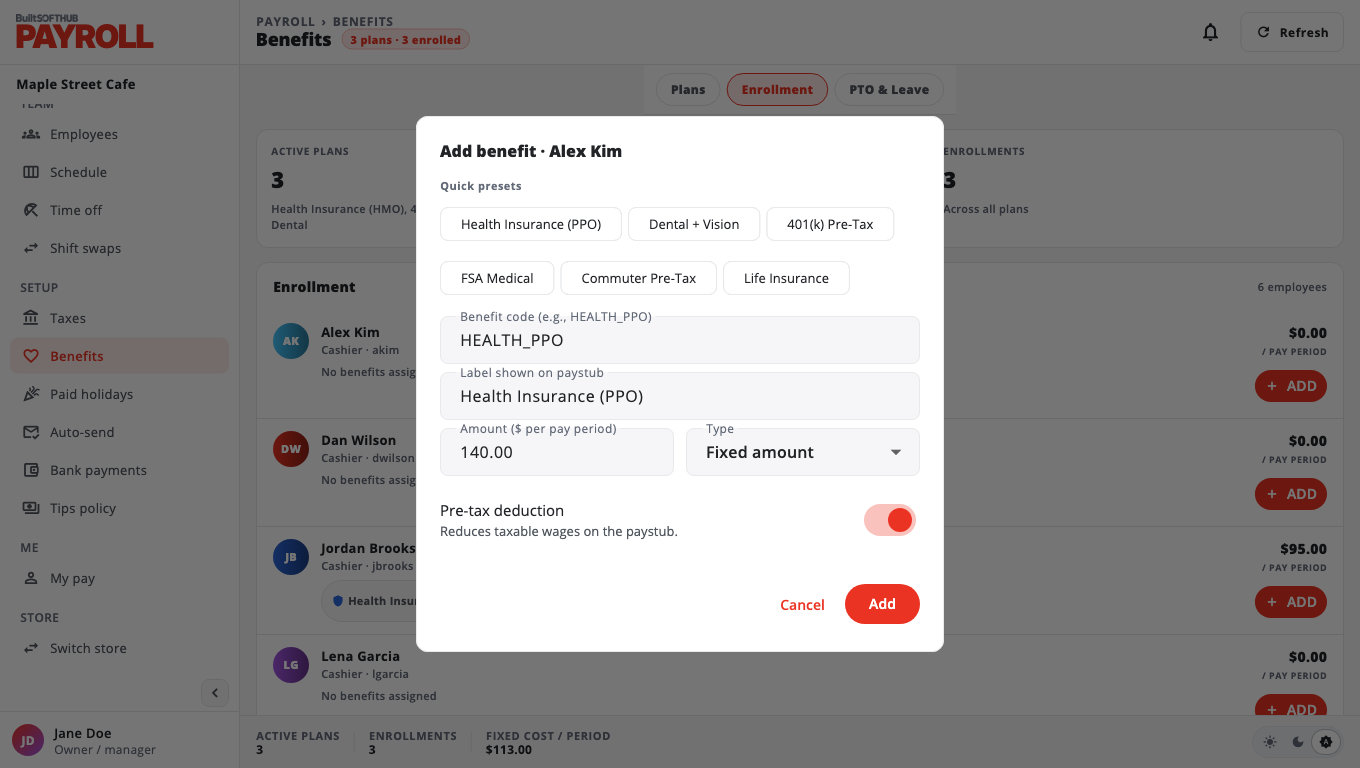
- Under Enrollment, find the employee and choose ADD.
- Pick one of the Quick presets (for example Health Insurance (PPO) or 401(k) Pre-Tax), or fill in your own:
- Benefit code and Label shown on paystub
- Amount ($ per pay period) and Type: Fixed amount or Percent of pay
- Pre-tax deduction: on means it reduces taxable wages
- Save it.
The deduction appears on the employee's next draft paystubs. To stop it, remove it from the employee's row. Past paystubs do not change.
Track PTO#
Under PTO & Leave, open an employee and enter Policy hours / year, Accrued hours, Used hours and Carryover hours. Choose Save.
Was this helpful?
Thanks for letting us know.
Sorry it did not help. Tell us what was missing: open Help & Support in the app and choose Report a problem, or email support@builtsofthub.com.