
Email paystubs automatically
Turn on Auto-send to email each employee their paystub PDF on a schedule.
- Open Auto-send.
- Switch on Enable auto-send.
- Under Frequency, pick Weekly, Bi-weekly, Semi-monthly or Monthly. For Semi-monthly or Monthly, enter the Day of Month (31 means the last day). Otherwise pick the Day of Week.
- Enter the Time of Day (24-hour, for example 17:30) and check the Timezone.
- Under Recipients & Channels, keep Email each employee a PDF on. Turn on CC owner email to get a copy of every paystub.
- Edit the Subject Line and Body under Email Template. Use the listed variables to add names and amounts.
- Choose Save.
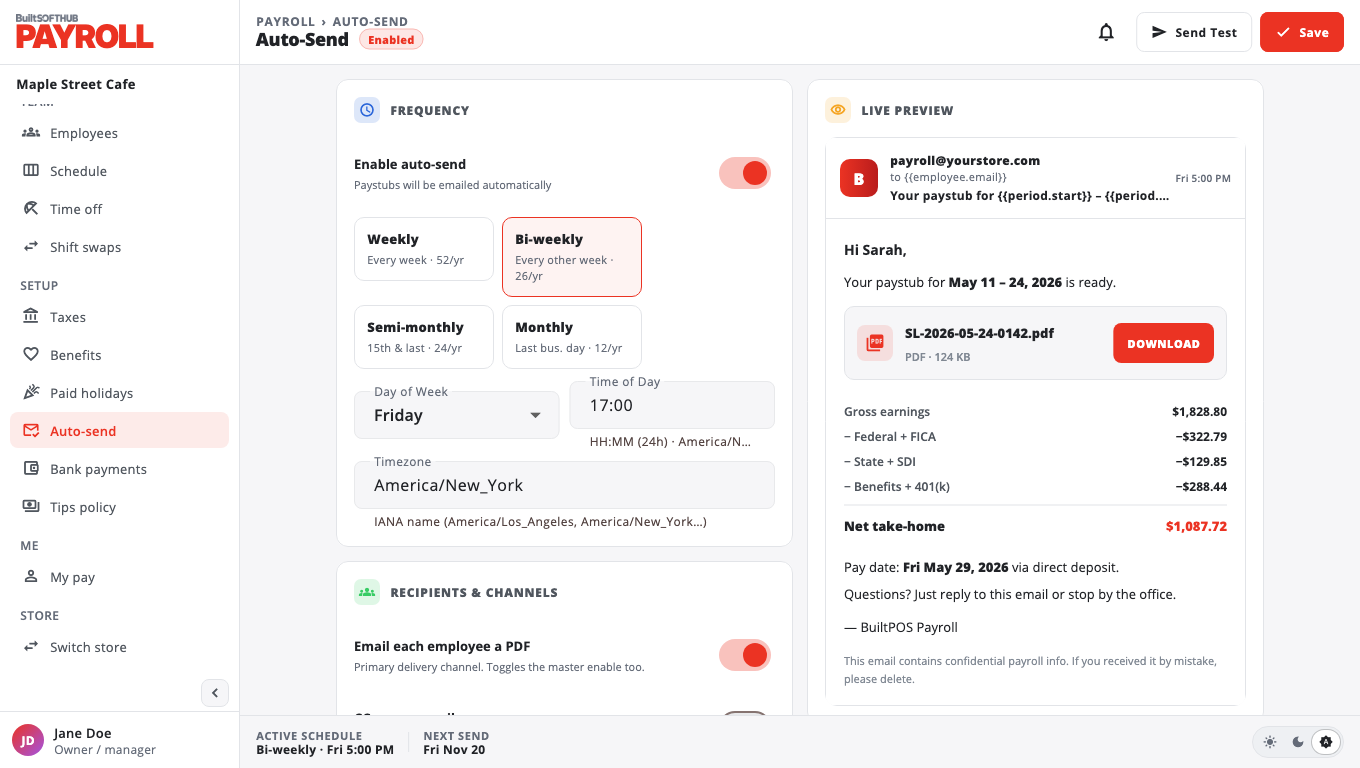
Upcoming Send Dates shows the next sends. Recent Sends shows what went out.
Choose Send Test to send a sample to yourself first.
Each employee needs an email on their profile in Employees. Paystubs that could not be sent show as Failed in Paystubs.
Was this helpful?
Thanks for letting us know.
Sorry it did not help. Tell us what was missing: open Help & Support in the app and choose Report a problem, or email support@builtsofthub.com.