
See the payroll report
Hours, overtime, pay, taxes and labor cost per employee for a pay period or any date range, with PDF, Excel and CSV export.
- Open Payroll report.
- Choose Pay period and pick a period, or choose Date range and pick the dates.
- Read the totals at the top: employees, hours, overtime, gross pay, net pay and labor cost. Stores on BuiltPOS also see orders, net revenue, labor % and sales per labor hour.
- The table lists each employee. Use Sort by to sort it.
- Export with PDF, Excel or CSV.
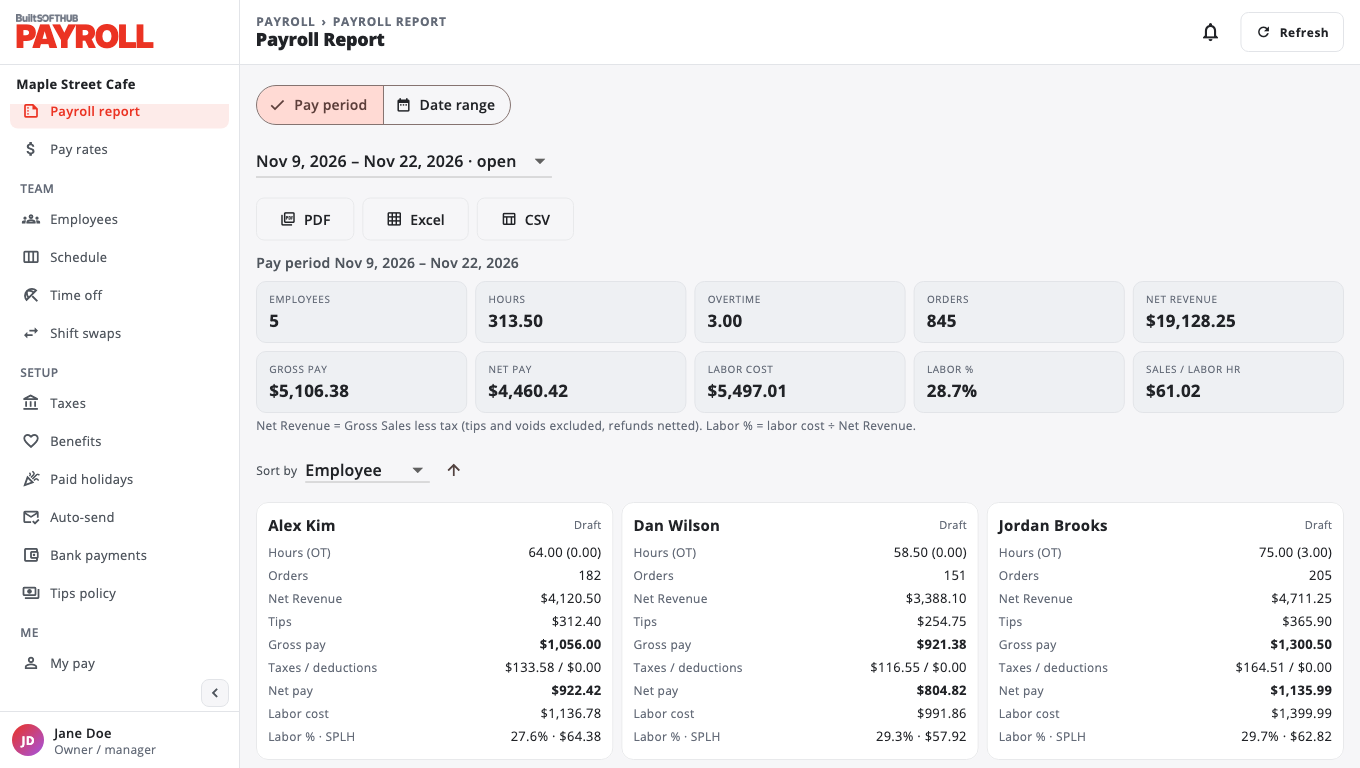
Rows marked Estimated have no paystub for that window yet. Their gross pay is hours × pay rate, and taxes and net pay appear once you run payroll.
Was this helpful?
Thanks for letting us know.
Sorry it did not help. Tell us what was missing: open Help & Support in the app and choose Report a problem, or email support@builtsofthub.com.