
Card declined, timed out or terminal not reachable
Read the "What to do next" box, avoid charging a card twice, and get the card terminal talking to the till again.
When a card payment doesn't go through, the payment popup tells you what happened and shows a WHAT TO DO NEXT box at the top. Follow that box first — it is written for the exact message the terminal gave. Below it you'll see Terminal said: … with the terminal's own words.
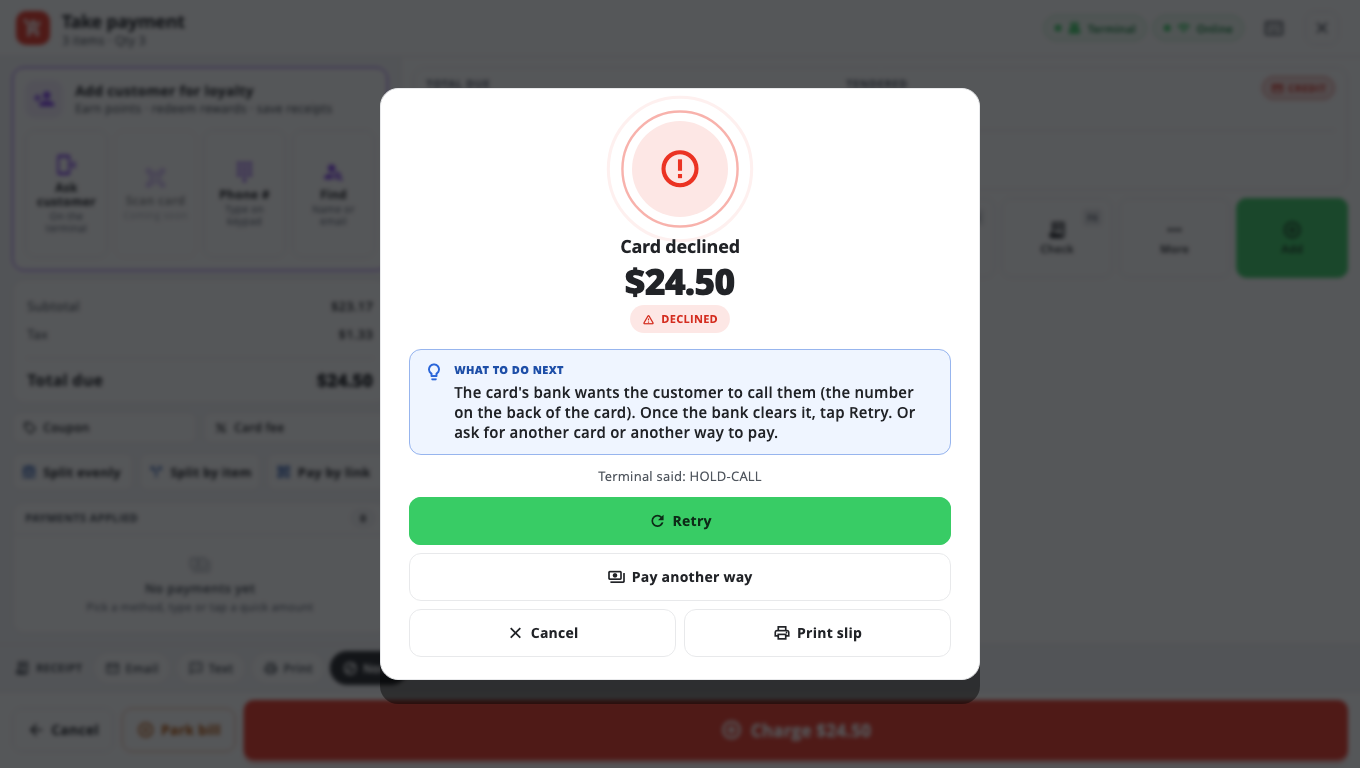
The buttons#
- Retry — try the same payment again.
- Pay another way — shown when nothing was charged; close the card attempt and choose cash or another method.
- Cancel — close the popup. If the terminal is still waiting for a card, the till also tells the terminal to stop.
- Print slip — print a slip showing the decline, if the customer wants proof.
Will Retry charge the customer twice?#
No. Retry sends the same sale again with the same reference, so the terminal and processor can tell it is the same payment, not a new one. If BuiltPOS thinks the last try may already have gone through, it refuses with a message about a duplicate charge being prevented. Then:
- Look at the card terminal's screen.
- If it shows APPROVED, don't charge again — tell a manager.
- If it shows declined or nothing, wait a few minutes and tap Retry, or use another way to pay.
Card declined#
The box tells you what the bank wants. Common ones:
- Call the bank (HOLD-CALL, REFER) — the customer calls the number on the back of the card. Once the bank clears it, tap Retry. Or take another card.
- The terminal couldn't read the card (FAILURE CV) — nothing was charged. Tap Retry and have the customer insert the chip if tapping failed, or tap if inserting failed.
- The tap was interrupted — tap again and hold the card still, or insert the chip.
- General error — check the terminal screen first. If it shows APPROVED, don't run the card again.
- Partial approval — the bank offered only part of the amount and the terminal refused it. Use another card or payment. If this card later shows up on your batch report, void it on the terminal.
- Insufficient funds, closed account, expired card — ask for another card or another way to pay.
From the second decline of the same card on one sale, the box also says how many times it has been declined, so you know to stop retrying.
Terminal timed out#
The customer may or may not have been charged.
- Look at the card terminal's screen.
- If it shows APPROVED, don't charge again.
- If it is still asking for a card, cancel it on the card terminal, then tap Retry on the till.
Cancelling a card payment#
Tap Cancel while the terminal is waiting. The till shows Cancelling — waiting for the terminal's answer…. Some terminals can't be cancelled from the till — then cancel on the terminal itself; the till unlocks when the terminal answers. If the terminal clearly shows cancelled and the till is still waiting, tap Terminal shows cancelled — close.
"Couldn't reach the card terminal"#
- Check the card terminal is switched on and showing its normal screen (not updating).
- Check it is on the same Wi-Fi or network as the till.
- Tap Retry.
- If the terminal shows it is updating, wait until it shows its normal screen, then retry.
- Take the payment another way if it still fails, and contact support.
Some PAX terminals change network address after the router restarts. If the terminal was set up with its serial number, BuiltPOS looks for it on your network by itself and tries once more.
"Internet required"#
Cloud card services (Clover Cloud Pay, Worldpay Cloud) need the internet. Nothing was charged. Use cash or another way to pay, or wait for the connection to come back and tap Retry.
Good to know#
- Card terminal setup is locked: a brand's page says Payment setup is managed by BuiltPOS. An Owner or Admin can still switch to another terminal already set up on this till, or tap Use no card terminal, on the Card Terminals list. To add a terminal, change its address or the processor, contact BuiltPOS support — they can give you a one-time payment-setup token.
- If the terminal account is refused, or the till says the terminal is not set up, take payments another way and contact support.
- Owners and Admins can see every card attempt in Store Management → Card Logs.
- How to take a card payment: Take a card payment. Hardware set-up: PAX terminal, Clover.
Was this helpful?
Thanks for letting us know.
Sorry it did not help. Tell us what was missing: open Help & Support in the app and choose Report a problem, or email support@builtsofthub.com.