
Print, email, text and reprint receipts
Choose what happens to the receipt after a sale, send it by email or text, and find and reprint an old receipt.
Reprint the last sale#
- Open More and tap Reprint Last.
It prints the last sale on this till straight to the receipt printer.
Find and reprint any receipt#
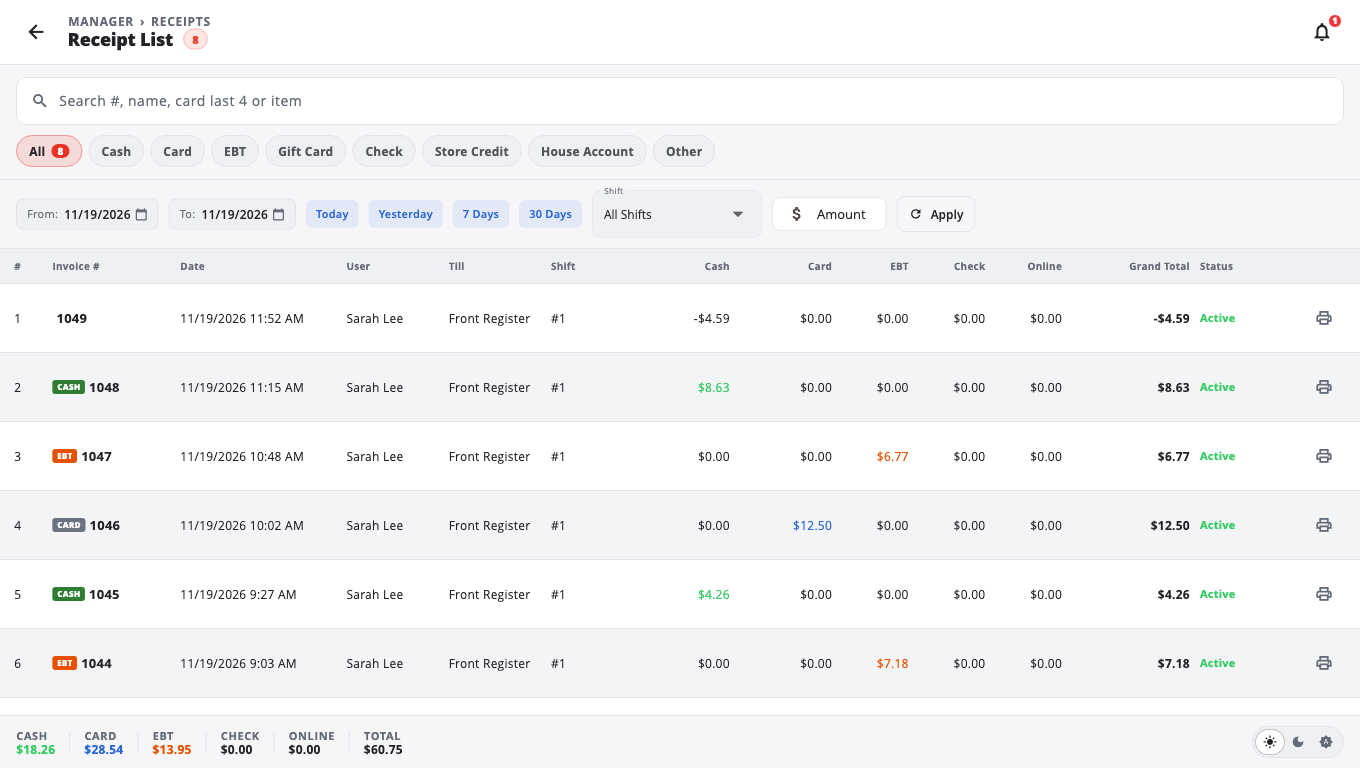
- Open More and tap Receipts (on the Manager's Functions sheet it is Receipts List).
- The Receipt List shows this till's sales. Use the search box (Search #, name, card last 4 or item), the date range (From: / To:) or Filters to narrow it down.
- Tap a sale to see the receipt.
- Tap Reprint, or the print icon on the row.
- On the receipt you can also tap Email Receipt, Text Receipt, Share or Print Gift Receipt.
Send a receipt by email or text#
- Open the receipt (after the sale, or from the Receipt List).
- Tap Email Receipt and enter an Email address, or tap Text Receipt and enter a Phone number (at least 7 digits).
- Tap Send.
If the till is offline, the email or text is queued and sent when the connection is back.
Choose what happens after each sale#
Each payment type has its own rule. Set them in Store Management → This Till → Terminal Settings → Printer → Receipt Printing:
- Print — prints straight away.
- Popup — a small Sale Complete card with the total and change, and Print / Done buttons.
- Preview — shows the full receipt on screen.
- Don't Print — no receipt.
Out of the box, On Cash Payment and On Payout are set to Preview, card, EBT, check and split payments to Print, and mobile pay to Don't Print.
Under Card sale copies you can choose Customer only or Merchant + customer (the merchant copy has a signature line).
Other tills and kitchen slips#
- The Till filter in the Receipt List can show All tills. That needs a connection to the store.
- In Restaurant mode the Receipt List has a Kitchen slip tab. You can reprint a kitchen ticket from there (a cashier needs a manager PIN).
Good to know#
- Receipts that print blank or not at all: see Printer problems.
- To change the receipt layout, logo and footer, use the Receipt Designer. See Receipt designer.
Was this helpful?
Thanks for letting us know.
Sorry it did not help. Tell us what was missing: open Help & Support in the app and choose Report a problem, or email support@builtsofthub.com.