
Verifone and Ingenico terminals
What works with Verifone P200/P400 and Ingenico Lane terminals today, and how their connection settings are entered.
On this page
Check with BuiltPOS support before you buy a Verifone or Ingenico terminal for BuiltPOS. On the Card Terminals list both say they take card sales through a local driver, "check with BuiltPOS support before going live": the driver has not been tested with every processor, and your processor must set up your merchant account for the terminal. PAX, Clover and Worldpay are the fully supported choices — see Which hardware works.
Payment setup is managed by BuiltPOS. You need BuiltPOS support, or a payment-setup support token from them, to open these pages — see Choose the card terminal for a till.
Enter the connection details#
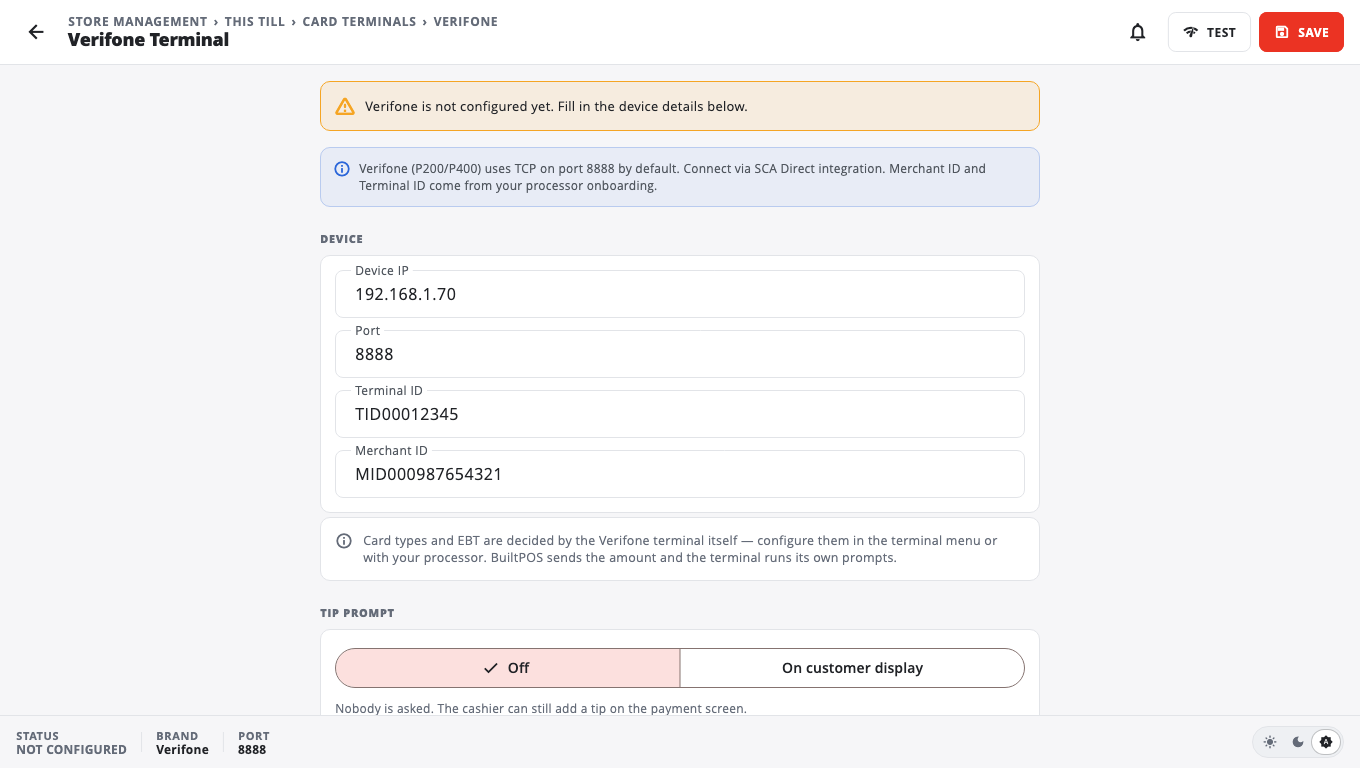
- Open Store Management → This Till → Card Terminal → Verifone (or Ingenico).
- Under Device enter the Device IP and Port. The usual port is 8888 for Verifone and 6000 for Ingenico.
- Enter the Terminal ID and Merchant ID from your processor.
- Under Capabilities, choose the card types you accept (EBT is off by default).
- Choose the Tip prompt: Off or On customer display (these terminals cannot be asked to prompt for a tip themselves).
- Tap Save. This brand becomes this till's card terminal.
- Tap Test. TCP socket open at … — terminal is reachable. only proves the till can reach the device on the network; it does not run a payment.
Good to know#
- With no device IP saved, card sales fall back to manual entry. To stop pointing the till at it, tap Use no card terminal on the Card Terminal list.
- Refunds on these terminals need the original sale: start them from the original receipt, not as a typed amount. See Refunds and exchanges.
Was this helpful?
Thanks for letting us know.
Sorry it did not help. Tell us what was missing: open Help & Support in the app and choose Report a problem, or email support@builtsofthub.com.