
Set up a Worldpay (triPOS) terminal
Connect a Worldpay terminal through triPOS Cloud or triPOS Direct, enter your Express credentials and switch from Sandbox to live.
Payment setup is managed by BuiltPOS. You need BuiltPOS support, or a payment-setup support token from them, to open this page — see Choose the card terminal for a till.
Have your Worldpay onboarding email ready — the Express section has the values you need.
Cloud or Direct?#
- Cloud — the till talks to Worldpay's triPOS Cloud over the internet. Works anywhere with internet.
- Direct — the till talks to the triPOS Direct Windows service on a PC in your store. No cloud round-trip.
triPOS Cloud#
- Open Store Management → This Till → Card Terminal → Worldpay.
- Under Connection Mode choose Cloud.
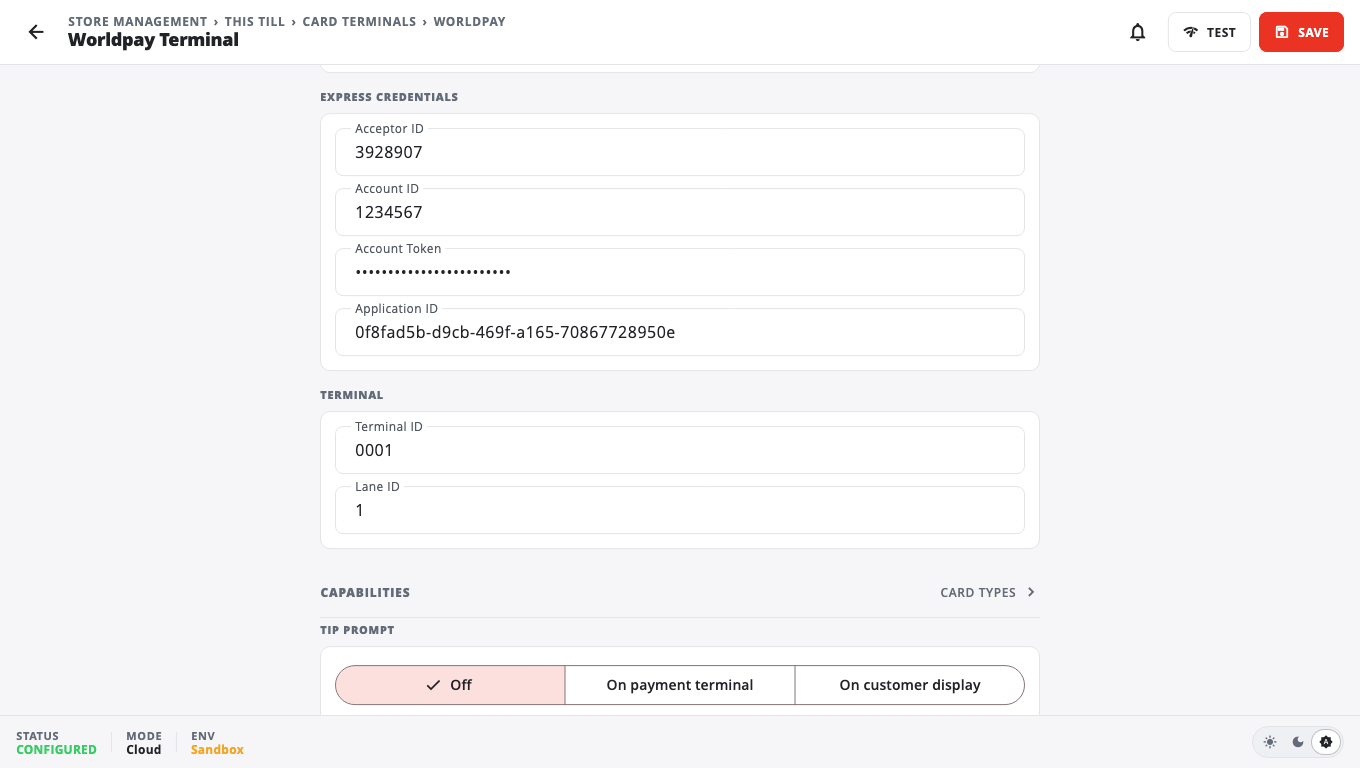
- Under Express Credentials enter Acceptor ID, Account ID, Account Token and Application ID.
- Under Terminal, enter the Terminal ID and the Lane ID for this register (Worldpay assigns one per lane; often 1).
- Sandbox / Certification is on for a new setup (testing). Turn it off to take real payments — the line under it then reads (LIVE).
- Tap Save, then Test.
- Go back to Card Terminal and tap Use on Worldpay.
triPOS Direct#
- Install triPOS Direct from Worldpay on the Windows PC the terminal is connected to.
- Open triPOS Direct's own configuration and enter your Express credentials there (not in BuiltPOS).
- Start the triPOS Direct Windows service.
- In BuiltPOS choose Direct, then enter the Host (leave localhost if BuiltPOS runs on the same PC, otherwise that PC's network address) and Port (default 8080).
- Enter the Terminal ID and Lane ID, tap Save, then Test.
- Go back to Card Terminal and tap Use on Worldpay.
Options#
- Capabilities — Credit cards, Debit cards, Contactless / Tap-to-pay and EBT / Food Stamps (EBT is off by default).
- Tip prompt — Off, On payment terminal or On customer display. Pick one place so the customer is asked once.
Good to know#
- If Worldpay does not answer in time, the till asks Worldpay to reverse the sale so the customer is not left with a charge the till never recorded. If the till says the reversal could not be confirmed, check the terminal before charging the card again.
- Problems: Card terminal troubleshooting.
Was this helpful?
Thanks for letting us know.
Sorry it did not help. Tell us what was missing: open Help & Support in the app and choose Report a problem, or email support@builtsofthub.com.