
Keep selling when the internet is down
What still works when the till loses its connection, how to read the cloud icon, and how to send waiting sales once you are back online.
BuiltPOS keeps a copy of your store on the till. When the internet drops, you keep ringing sales and everything is sent to the server when the connection comes back.
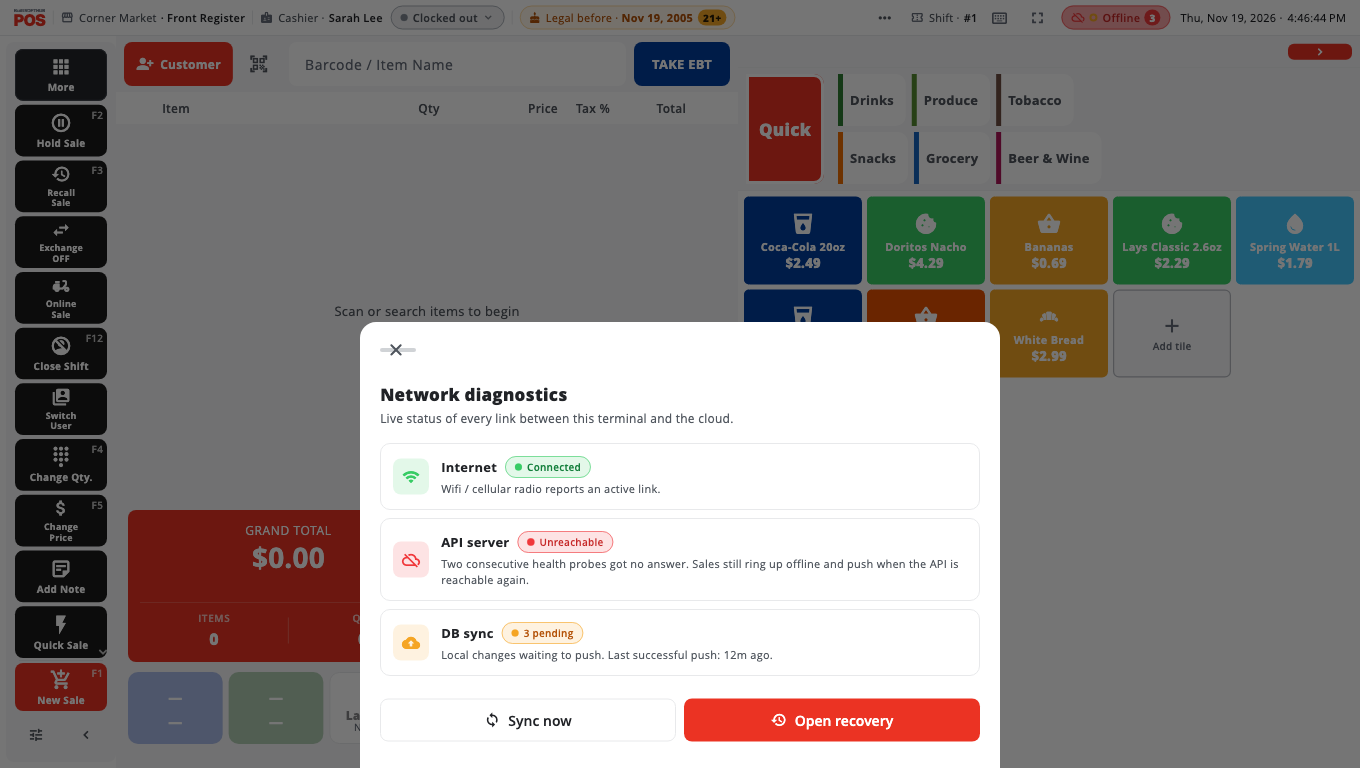
Read the cloud icon#
The cloud icon in the top bar shows the connection:
- Online — connected.
- Slow — the server is answering slowly. Sync may take longer.
- Offline — the server cannot be reached. Sales are saved on the till.
A small dot on the icon shows sync: Synced, Sync pending (things are waiting to upload) or Sync failing.
Tap the icon to open Network diagnostics. It shows Internet, API server and DB sync, how many items are pending, and when the last push worked.
What keeps working offline#
- Signing in with your PIN.
- Ringing sales and taking cash payments.
- Card payments on a terminal that is on your store network (for example PAX). Cloud card services (Clover cloud, Worldpay cloud) need the internet; the till says Internet required and suggests cash or manual entry.
- Refunds, holds, clock in and out, closing shifts and stock changes. They wait on the till and sync later.
- Email and text receipts are queued and sent when you are back online.
- Kitchen tickets to a printer or kitchen screen on your store network. Tickets that could not be delivered are retried.
What needs a connection#
- Looking at other tills' sales (All tills in the Receipt List, Whole store on Close Day).
- Shift swaps.
- Some customer, gift card and house account actions that must check a balance with the store.
Send waiting sales now#
- Tap the cloud icon.
- Tap Sync now.
If something keeps failing, tap Open recovery (or go to Store Management → System & Data → Sync Recovery). It lists sales and refunds the server refused, with options to re-send them.
Good to know#
- Do not reset or reinstall a till that has sales waiting to sync. They exist only on that till until they upload.
- BuiltPOS checks your licence with our servers. If it cannot reach them, it keeps working on the last good check for about two days. See Licence and trial problems.
- A red strip at the top saying This terminal is not linked or Store not found on the server is different: the till still rings sales, but nothing syncs until it is linked. See Red strip and linking.
- Still stuck? See Offline and sync problems.
Was this helpful?
Thanks for letting us know.
Sorry it did not help. Tell us what was missing: open Help & Support in the app and choose Report a problem, or email support@builtsofthub.com.